
Run a TrueNAS pool long enough, and someone will warn you: stay under 80% full. The “80% rule” for capacity is like a ghost story of ZFS storage administration. Everyone has heard of it, but ask a room of admins why it exists, and the answers get vague fast. It gets passed around like hearsay: advice from a wise old sage, who heard it from another wise old sage, repeated until it becomes a mantra people cite without being able to justify it.
The rule holds that ZFS pool performance degrades once utilization passes roughly 80%, driven by fragmentation, metaslab pressure, and, on spinning disk, LBA weighting.
While the laws of physics apply to all filesystems, the TrueNAS and ZFS communities are often very interested in preserving not just the safety of their data, but reliable and consistently rapid access to it. Here’s what’s actually driving the slowdown.
The Three Problems
The performance penalty that started the 80% rule isn’t a single, monolithic problem. It’s a mix of three distinct phenomena, and how much they impact you depends entirely on what your storage is actually doing.
Every file system has the complex task of mapping user data to specific physical locations on the disk – by using Logical Block Addresses (LBAs) the file system doesn’t need to know the exact geometry or layout of the physical storage media. As the media fills up, there is a secondary problem of housekeeping, and finding contiguous space to store new user data. When the free space is scattered across the disk rather than gathered together, the data is said to be “fragmented.”
The algorithms for avoiding fragmentation and LBA selection are rooted in physics, so they hit other filesystems the same way, regardless of what’s formatted onto the disk.
NTFS and ext4 fight the identical seek-time problem on spinning media, and both use their own placement tricks to keep related data physically close together. Copy-on-write filesystems like btrfs run into the same free-space hunting problem ZFS does as they fill, for the same reason: fewer large contiguous regions left to allocate from. Every filesystem pays some version of this tax eventually. ZFS just happens to name its mechanisms out loud, so it gets blamed by name.
Fragmentation. At its core, ZFS is a copy-on-write filesystem. When you modify data, ZFS writes the new version to free space first, then releases the old blocks (unless they’re held by a snapshot, clone, or other ZFS feature). As that free space gets written and overwritten, the contiguous free space shrinks, and finding large chunks becomes a chore. With higher fragmentation, writes get scattered, and those scattered writes eventually turn into scattered reads. At 50% full, the pool handles this easily: there’s much more empty space for new writes, and enough gets cleaned up as deletes happen to leave large chunks again. At 90% full, the pool is working significantly harder per I/O.
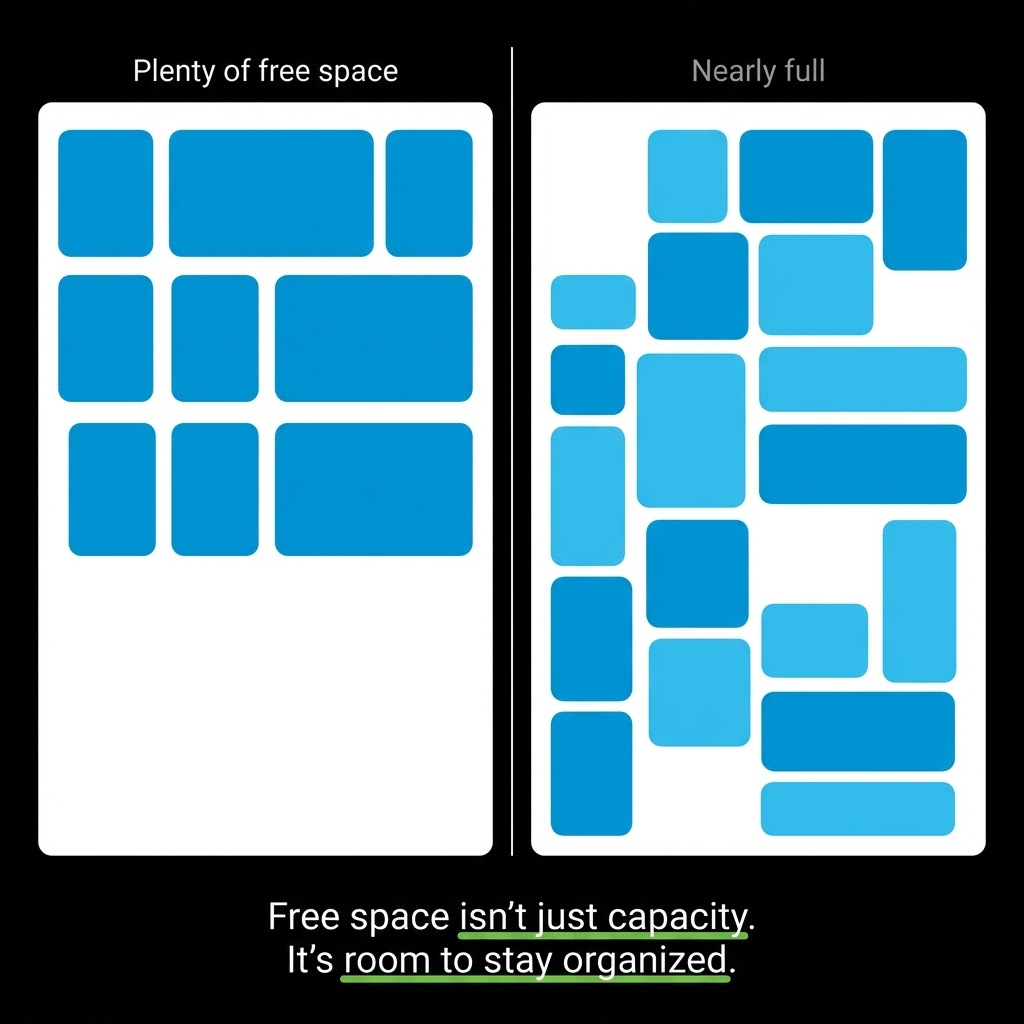
Metaslab pressure. ZFS organizes free space into “metaslabs”: chunks of contiguous space on a vdev. When you write new data, ZFS looks for the metaslabs with the most room to spare. As the pool fills up, the algorithm has fewer options and less room to maneuver. The overhead of managing that remaining space climbs sharply as the pool fills.
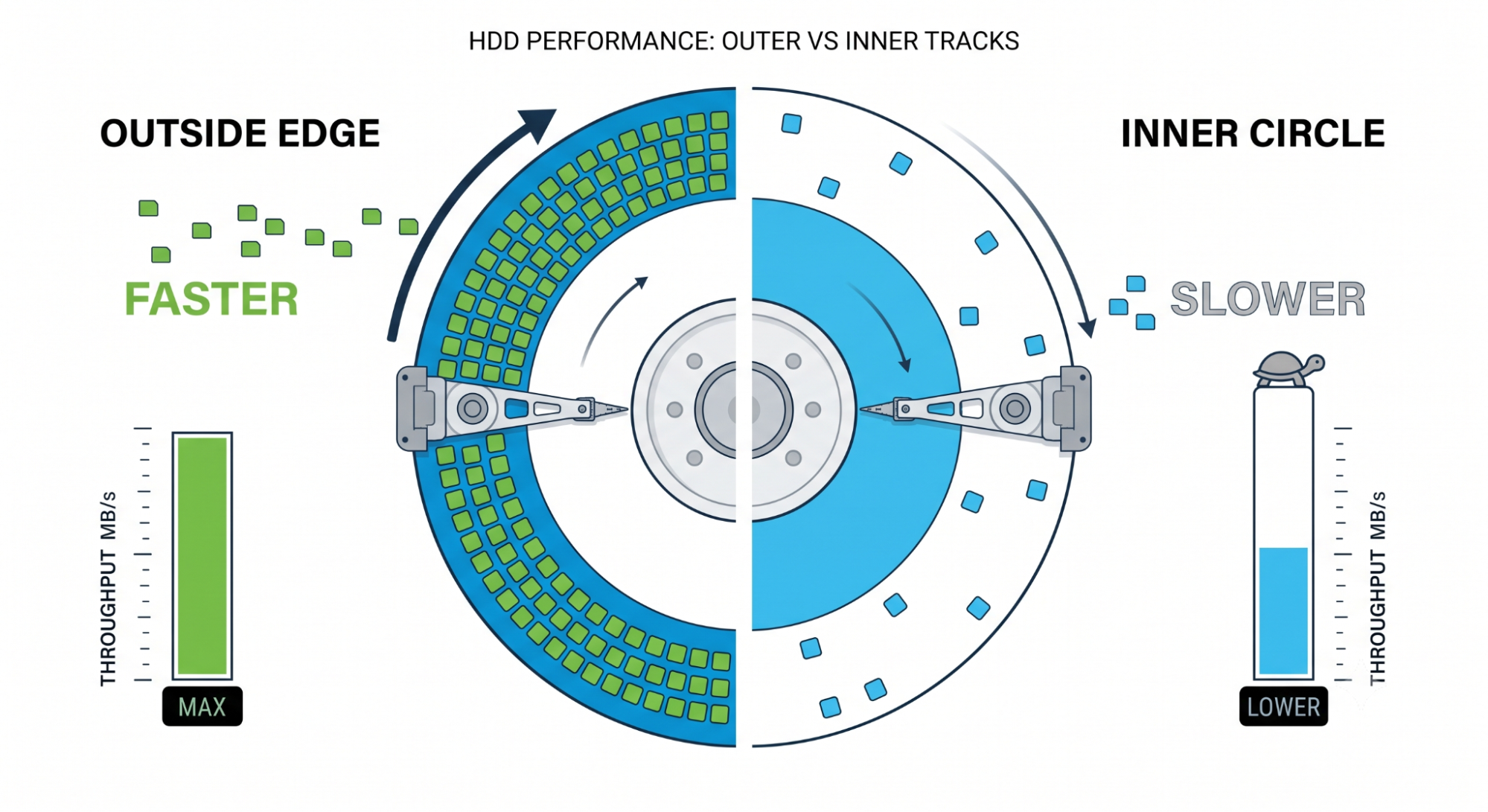
LBA weighting (rotating media only.) On spinning disks, ZFS biases writes toward the lower logical block addresses (LBAs) to keep data physically closer together, reducing seek distance. As the pool fills and those lower LBAs vanish, ZFS is forced further inward on the disk. Rotational velocity drops, seek times spike, and performance suffers. This is a spinning-disk problem: ZFS disables LBA weighting for flash media, since flash has no seek time to protect.
Doesn’t Flash Fix This?
Flash storage sidesteps the physical seek-time problem entirely, which means the physics behind storing bits on spinning magnetic media get sidelined. But managing a pool of NAND has its own challenges. The tradeoff looks different from spinning disk, but the same “how full can it get” question applies whether you’re running all-flash or a hybrid flash-and-disk design.
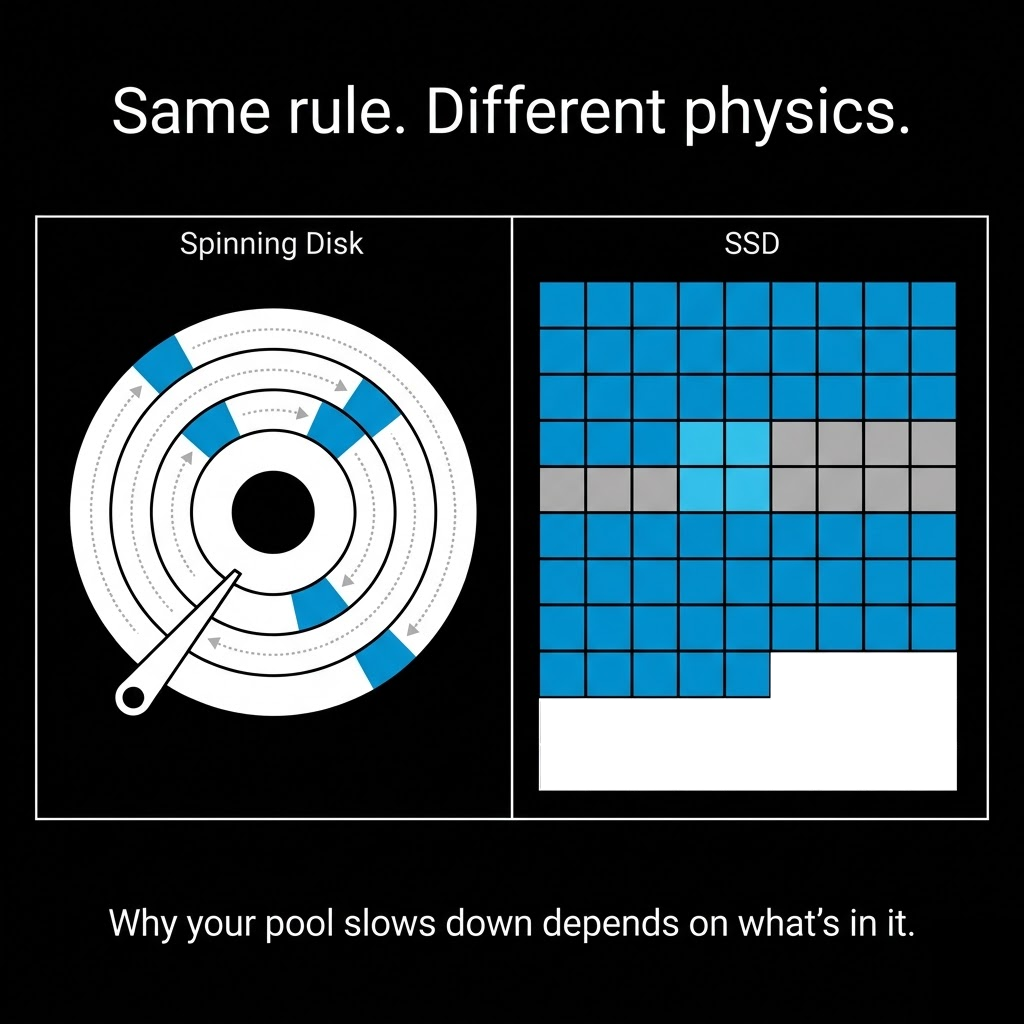
SSDs write data at the “page” level, usually between 4KB and 16KB depending on the drive, but erase data at the “block” level, a much larger unit measured in megabytes. A controller can program a fresh page efficiently. But when it needs to reclaim space, it has to erase an entire block, which requires reading, erasing, and rewriting all the valid pages in that block. Copying the valid data causes “write amplification,” and it worsens as the drive runs out of empty pages.
In other words, a nearly full SSD has less room to breathe. The controller has to work harder to find space, erasures and rewrites happen more often, and performance takes a hit. The penalty isn’t as severe as the seek time of a spinning disk, but it’s still very much there.
When the Rule Can Bend
The “80% rule” assumes a “normal” mixed workload: reads, writes, updates, deletes, with some random I/O thrown in. That assumption covers most typical use cases, but not all of them.
Consider an archival pool for write-once data, like a backup repository. This storage has no in-place overwrites, deletes happen after a long retention period, and access is almost exclusively sequential. Fragmentation is much less of a worry here, because there’s no real churn to the data. Data is written and deleted in large, multi-gigabyte files, further reducing metadata overhead.
On pools like this, going past the 80% “rule” and filling up to 90% or even 95% is completely reasonable; the performance at that utilization level is perfectly fine because the workload doesn’t demand more than the laws of physics can provide. At that point, the key concern is making sure you have enough space to absorb the ever-expanding capacity of regular backups.
But on the other hand, consider block storage for a team doing heavy random I/O with frequent overwrites: a virtualization, machine learning, or AI workload. The fragmentation pressure at 80% is real, the seek penalty on spinning disk is significant, and the impact on latency is measurable. Here, 80% might already be too loose for a spinning disk system.
Where you land depends on your workload – the 80% “rule” is a starting point to manage against, not a hard threshold where your system suddenly “doesn’t work” any longer.
Even Matt Ahrens, one of ZFS’s original creators, has made this argument himself: he’s pointed to pools running comfortably well past 80%, up toward 96% utilization, for the right access patterns. See the discussion.
What to Do Next
Now that you know what’s actually behind this rule, the next step is figuring out where your own workload lands.
Know Your Workload.Big, sequential writes and reads are a lot more tolerant of a pool that fills up. If you’re primarily moving data by the gigabyte at a time, you’ve got an entirely different use case from someone measuring in database transactions per second.
Latency Under Load.Measure your latency as your pool fills, using the metrics in Six Metrics for Measuring ZFS Pool Performance. If your latency holds steady at 85% full, you have your answer.
Don’t Neglect Capacity for Capacity’s Sake.The 80% “rule” can bend, but running out of space is never a good situation. Get ahead of it: track your growth trend, not just today’s percentage, so a capacity crunch doesn’t turn into an emergency purchase order.
The Bottom Line
The 80% rule exists for good reasons rooted in ZFS internals. But “results may vary” is the honest answer here, not a dodge.
Know your workload, and let your latency numbers make the call.
The grizzled veteran who told you to “stay under 80%” probably wasn’t wrong – they just never explained why.
Don’t let a capacity guess become a 3am emergency. Talk to the team at TrueNAS about sizing it right the first time.
FAQ
What happens if a ZFS pool goes over 80% full?
Performance typically degrades gradually rather than failing outright. Fragmentation increases, ZFS has fewer large metaslabs to allocate from, and on spinning disk, writes get pushed to slower regions of the platter. How much you notice depends on your workload.
Does the 80% rule apply to flash storage?
Partially. SSDs don’t have the seek-time penalty that makes the rule matter most on spinning disk, but a full flash pool still faces more write amplification as the controller works harder to find erasable blocks. The penalty is smaller, not absent.
Is there a hard capacity limit in ZFS?
Obviously you won’t want to fill your pool to 100%, of course – but ZFS pools can run well past 80% depending on workload; the practical limit is when your latency or throughput crosses what your application can tolerate. At approximately 96% full, ZFS will shift to a “best-fit” behavior when allocating space, so all but the simplest and easiest workloads will notice at that point.
Does the 80% rule apply to all workloads equally?
No. Archival, write-once workloads with mostly sequential access tolerate much higher utilization than workloads with heavy random I/O and frequent overwrites, like virtualization or database workloads.