
“Add more RAM” is the right answer to a slow storage system more often than not; but it’s also not always the answer you get to give. Budget caps it. Technical limitations of your motherboard cap it. Consolidating more workloads onto fewer nodes caps it hardest of all. At some point you’re running a working set bigger than the memory you’re allowed to put in the box, and no amount of wishing changes that math.
When RAM runs out, TrueNAS lets you expand your cache with L2ARC, a second-level SSD-backed read cache that keeps reads fast when your working set outgrows RAM.
That’s the situation OpenZFS was built to handle gracefully – not by pretending RAM is infinite, but by giving you a second tier when it isn’t.
ARC is the cache that makes ZFS feel fast
TrueNAS is built on OpenZFS, and the reason ZFS reads feel fast is the ARC – the Adaptive Replacement Cache, sitting in system RAM. ARC isn’t just holding recently-used data. It splits attention between data that’s been read once and might be read again soon, and data that’s genuinely marked hot from repeated access. It also tracks what data was evicted and how soon after eviction that data was read, to know whether that eviction was a “mistake” – which is what adds the “adaptive” to ARC. Rather than running on fixed rules and ratios, it dynamically corrects itself against your actual workload in real-time.
When RAM is generous, this is close to the whole story. Reads come from memory, latency is close to zero; and nobody thinks about caching at all.
RAM is finite. Your working set usually isn’t.
Enterprise systems get generous RAM – hundreds of gigabytes, usually – but it’s never unlimited. Compact or energy-efficient home systems running TrueNAS Community Edition might have much less. A 32 GB system gives up a small chunk to the OS and services before ARC ever sees it, and if your working set is bigger than what’s left, you’re evicting data ARC would rather keep. More evictions mean more cache misses, which means more reads falling through to the pool disks – and even if you’ve built a system out of nothing but NVMe, RAM beats storage by a wide margin, virtually every time.
The failure mode here rarely announces itself as a caching problem. It shows up as “the server is fine until it has to relaunch this application,” or “file access degrades right after backups run,” or “performance is intermittent and nobody can explain why.” Most of the time, that’s cache pressure, not a mystery.
What L2ARC Actually Is
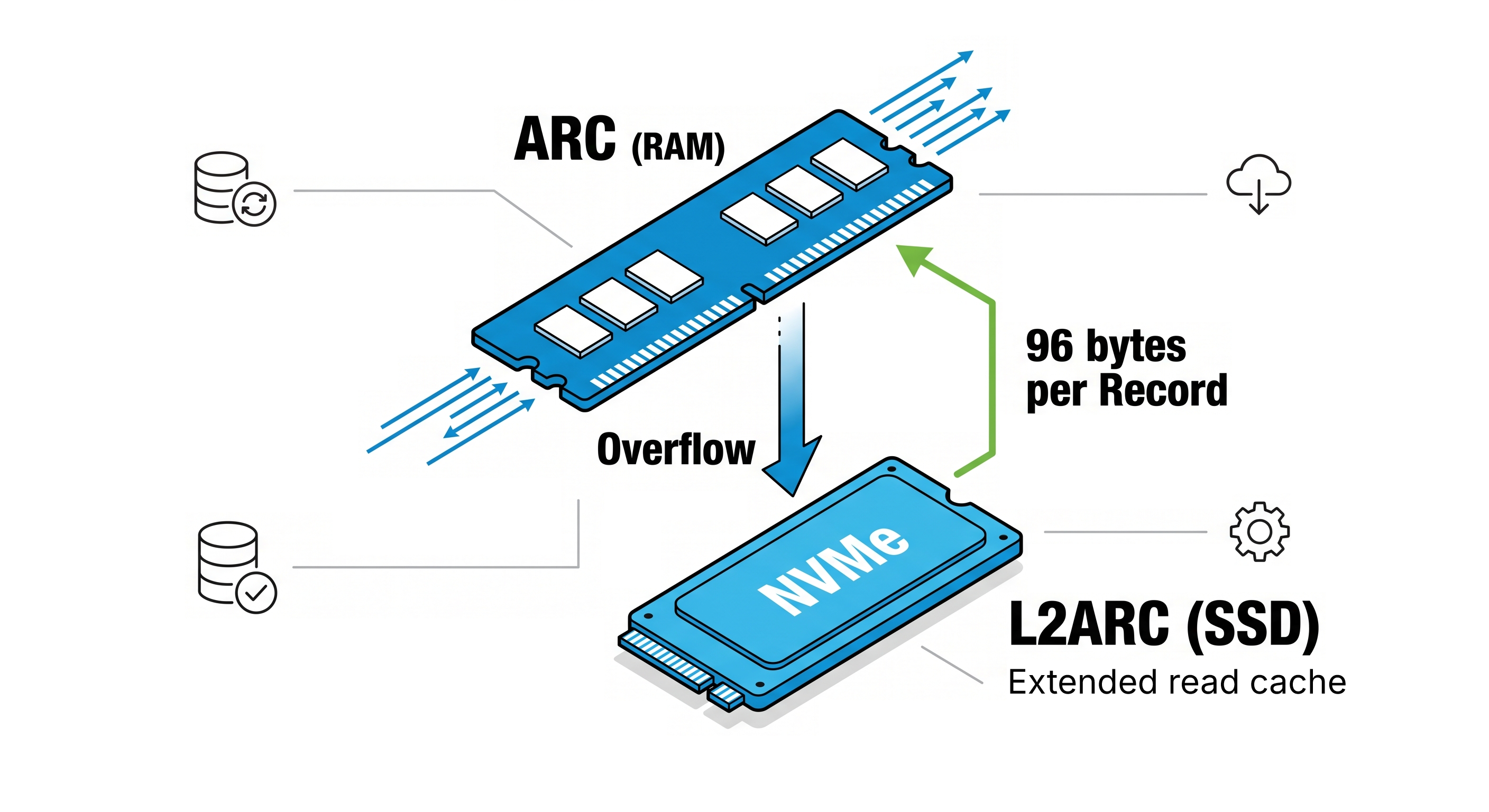
L2ARC – the Level 2 Adaptive Replacement Cache – extends ARC onto dedicated cache SSDs that give the read cache a second, larger tier to work with. A few things about it matter more than the rest:
It’s read-only. L2ARC accelerates reads, but does nothing for writes – that’s SLOG’s job, protecting synchronous writes on the way in, not reads on the way out. Good L2ARC devices are able to deliver rapid random reads – so while NVMe SSDs are the natural pairing here, anything faster than your pool can help. Community Edition users short on PCIe lanes or M.2 slots will often attach a SAS or SATA SSD to act as the overflow.
It’s non-critical. If your cache device dies, you lose nothing but the speed boost; TrueNAS falls back to reading from the pool like the L2ARC was never there. L2ARC is a simpler process as well; it doesn’t carry ARC’s adaptive intelligence. It’s closer to a sequentially-written overflow shelf that catches data on its way out of RAM, rather than a second brain making its own decisions.
Think of ARC as the librarian making judgment calls, and L2ARC as “more shelf space.” The shelf doesn’t decide what’s worth keeping – ARC already made that call in RAM – it just gives ZFS somewhere fast to put more of it.
OpenZFS feeds L2ARC deliberately: a background process scans data near eviction and writes it to the SSD in controlled, sequential bursts, which keeps the write pattern SSD-friendly and avoids burning endurance on data nobody will re-read. And in TrueNAS, L2ARC is persistent across reboots, so a maintenance window doesn’t force the cache to start cold.
L2ARC Costs RAM Too
This is where “just add a big NVMe cache” plans go sideways. Every block L2ARC stores needs a small header in ARC so OpenZFS can find it – 96 bytes per block. That sounds trivial until you do the math against your recordsize and L2ARC size.
With large records common for media or backup files (say, 1M), you get relatively few blocks and the overhead barely registers. But with small records – 16K for virtualization, or even smaller in some cases – you get far more blocks for the same cache capacity, and that per-block overhead starts eating into the RAM you were trying to relieve in the first place. TrueNAS does cap how much ARC can be consumed by L2ARC metadata in order to prevent an overly optimistic administrator from accidentally scoring an own-goal, but the principle holds regardless: an L2ARC sized without regard for recordsize can quietly work against you instead of for you, or end up as wasted space that won’t be used efficiently.
The rough formula is capacity in KB divided by recordsize in KB, times 96 bytes – and it’s worth running before you buy the SSD, not after.
Where L2ARC Earns its Keep, and Where it Doesn’t
L2ARC helps when the workload is read-heavy with real repetition, and the working set is larger than RAM – but not so large it dwarfs RAM and L2ARC combined. Virtualization image reads, multi-user file services where project data needs to stay hot across a team, and read-heavy analytics on datasets too big for RAM are the workloads that see the benefit most consistently.
It does less for you when the workload is write-heavy, when reads are mostly sequential and never revisited – like a backup job – or when the working set is so large that L2ARC turns into a low-hit parking lot. And if a small consumer system is already RAM-starved, adding L2ARC without checking the overhead math can make ARC less effective, not more.
The honest takeaway: L2ARC isn’t a substitute for adequate memory. It’s the next lever once memory is maxed out or the budget won’t stretch further.
Make it Repeatable instead of a One-Off Tuning Exercise
Plenty of platforms can bolt an NVMe read cache onto their filesystem. The harder question is whether that configuration is predictable across dozens of systems, supportable by whoever’s on call, and observable enough that you can prove it’s working rather than assume it. It’s the same logic behind why hybrid storage is having a moment again – match the media to the job instead of defaulting to one tier for everything.
That’s the gap TrueNAS Enterprise closes – RAM provisioning that accounts for the overhead advanced caching actually costs, NVMe cache capacity sized to the workload instead of guessed at, and the visibility to confirm impact after deployment rather than after a complaint ticket. The goal isn’t a bigger cache. It’s a cache tier that behaves the same way after the next reboot, the next upgrade, and the next workload shift as it did on day one.
TrueNAS exposes the metrics to check this through arcstats and arc_summary – including ARC hit trends, L2ARC hit/miss ratios, and warning signs that L2ARC metadata is putting pressure back on ARC. Look at those before and after deployment. If the numbers don’t move the way the design predicted, that’s a sizing problem, not an L2ARC problem.
Get it Right Sized by the Professionals
Don’t just treat “read caching” as a checkbox feature; get clarity on the workload’s read-to-write ratio, the recordsize in play, and how far the working set actually exceeds available RAM. Those three answers tell you whether L2ARC is the right lever or the wrong one – and they’re the same questions a validated TrueNAS Enterprise design starts from. Talk to a TrueNAS representative today about a complete storage solution, sized for your workload.
FAQ
Does L2ARC replace RAM?
No. ARC in RAM is faster and smarter than L2ARC will ever be. L2ARC is the tier you add once RAM is maxed out or the budget won’t stretch further, not a substitute for it.
What happens if an L2ARC device fails?
L2ARC is read-only and non-critical – if a cache drive dies, TrueNAS falls back to reading from the pool like the L2ARC was never there. Read performance might take a hit if that was your only L2ARC device, but your data is always safe.
How much RAM does L2ARC actually use?
About 96 bytes of ARC header space for every block cached on the L2ARC device. Run capacity in KB divided by recordsize in KB, times 96 bytes, before sizing the SSD – especially on small-recordsize workloads.
What’s the difference between L2ARC and SLOG?
Different jobs entirely. L2ARC extends the read cache onto SSD; SLOG protects synchronous writes on their way into the pool. One speeds up reads, the other speeds up writes, and a system can use one, both, or neither depending on the workload.