
“There’s nothing as constant as change.”
When you’re traditionally working with data, whether it’s on your laptop, a smartphone, or a TrueNAS storage system, your data often lives in flux – it’s created, saved, edited, saved, tweaked again, saved – in a never-ending cycle of updates. Our digital world allows for this to happen easily, without having to retain reams of paper highlighted with red ink.
But sometimes, those prior versions can be just as important – whether it’s the convenience of version control for a code repository, compliance requirements, illustrating the chain of custody of legal documents, or just protecting data from accidental or malicious modification. That’s where the concept of immutability comes in.
Immutability is one of the many elements of security that TrueNAS provides for your data. Whether it’s a matter of patient privacy, national security, or your own private documents, TrueNAS offers a defense-in-depth approach, including:
- Encryption-at-rest
- Encryption-in-flight
- Access Control
- User Authentication
- Replication/backup
- Immutability
While encryption, access controls, and replication are fairly well understood, immutability takes the next step and is a cornerstone of good backup and ransomware protection practices. This blog outlines the various levels of immutability provided by TrueNAS, and how you can leverage them to take your data protection to the next level.
Immutability vs Flexibility
By default, TrueNAS allows files and data to be changed; it’s necessary by design for productivity in most use-cases. Files can be created, modified and deleted by any user with the permissions to do so.
Immutability ensures that selected data is preserved for future use, restoration, and compliance, removing the natural flexibility that a storage system provides. Once made immutable, data cannot be changed or deleted.
To maintain flexibility while providing immutability where it’s needed, there are several layers of technology provided:
- ZFS snapshots
- Time-Locked SMB Shares
- Lockable S3 Buckets
- Snapshot and Dataset Immutability
- Veeam Backup Immutability
- Ransomware Defense
Immutable ZFS Snapshots
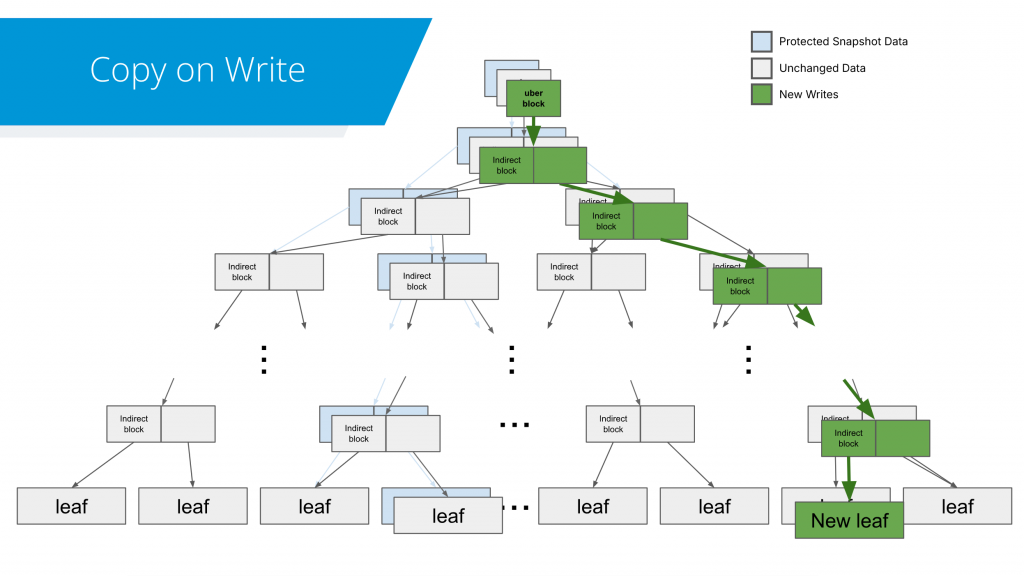
Immutability options start with the filesystem in TrueNAS – the “Copy on Write” behavior of ZFS means that data is never “overwritten in place” by design. New files and updates to existing ones are written into empty space on the filesystem, with the “pointers” to this data being redirected to the new location. Other popular filesystems like EXT4 overwrite in place, meaning old data is naturally destroyed by new writes to the same file.
In order to retain access to the previous versions, data can be protected from modification by enabling Snapshots in TrueNAS. Snapshots take advantage of “Copy on Write” by retaining previous copies of pointers, letting you view a file, folder, or entire dataset as it was at the exact point in time the snapshot was taken; and because this behavior is a cornerstone of the filesystem, there’s no way to change the contents. Make a new version, overwrite and change everything, or even delete it entirely, but TrueNAS will let you view that previous version – guaranteed.
Snapshots retain only the data that has changed since the previous snapshot. This storage efficiency, combined with immutability, has made ZFS snapshots very popular and helped many TrueNAS users preserve important data.
TrueNAS lets you create, manage, and delete thousands of snapshots to protect your data in the way that suits your workflow. With scheduled snapshots, adjustable granularity, and user-defined retention periods, TrueNAS gives you flexibility that fits your business needs, not fixed templates and locked-down configurations.
Immutable SMB using Time-Locked Shares
Anyone who’s ever burned a CD is familiar with the concept of a WORM device – something designed for a “Write Once, Read Many” workload. Optical media can enforce this at the hardware level – once the data is burned onto the disc, it physically can’t be changed.
TrueNAS offers similar functionality for shared SMB folders through Time-Locked Shares. Incoming writes are allowed a configurable grace period, but once the timer expires, write access is revoked – allowing content creators to share their file out for read-only access without requiring customized or complex permissions to be set.
Immutable S3 Buckets
Object-based protocols use simpler operations, such as GET and PUT, to manipulate data in a storage system. When building out object storage for backup or compliance purposes, protecting data from unwanted modification is crucial – and just like TrueNAS, object storage providers offer abilities to control what can be changed.
TrueNAS integrates and supports MinIO’s AIStor object storage suite, providing strong, tested immutability with both Governance and Compliance locks available for buckets. By setting a minimum retention period for saved data, it can be protected from overwrites, modifications, and deletion.
Governance mode can be used to prevent end-users from accidental deletions while still allowing system administrators to remove data, and the more strict Compliance mode prevents even the MinIO system administrator from deleting data until the retention period has passed.
These immutable object stores are ideal when coupled with data protection solutions from vendors like Veeam, HYCU, and Commvault, forming a critical component in the 3-2-1-1-0 backup strategy.
Snapshot and Dataset Immutability
Some vendors tout the “total immutability” of their systems, in that “even the administrator can’t delete data” from the disks. While this might sound beneficial, what it means under the hood is that your data isn’t fully within your control. If your data suddenly grows beyond your projections, sudden growth means you can’t free up space to continue day-to-day operations or keep your backup windows under control – and you’re at the mercy of an outside party as to when or if it’s possible.
TrueNAS offers full control over your data, with a selection of administrative roles that can be used to provide only the access needed – but still leave you with the ability to take decisive actions when the situation calls for it, without waiting on hold for approval from the company that holds the keys.
Snapshot Hold functionality allows administrators to flag specific snapshots, and the data within them, as crucial and immutable.
TrueNAS provides three templates for administrator roles:
- Monitor-Only Admins can monitor and review the status and health of a TrueNAS system. End-users or application owners can be provided this role for keeping an eye on their individual folders and quotas.
- Sharing Admins are perfect for day-to-day operations – these administrators can create shares, datasets, snapshots, and replication tasks, as well as grant users access to network shares. They can also place a Snapshot Hold, but cannot remove it. Notably, Sharing Admins do not have the ability to remove datasets, snapshots, holds, or perform other destructive actions. In addition to regular administrators, API keys and credentials can be safely assigned to this level.
- Full Administrators have full control. These accounts are your true ownership of your data, allowing you to release Snapshot Holds, make changes to network and hardware configurations, and make major system changes.
Snapshots with a Hold flag set are exempt from the retention period expiry and prevent their underlying dataset or volume from being deleted by Sharing Admins until the hold is released.
All accounts can be protected with Two-Factor Authentication, based on the open RFC 6238 standard using any TOTP (Time-based One Time Password) authenticator hardware or app.
TrueNAS Enterprise takes this a step further by authenticating login credentials against Active Directory or LDAP. Any admin can be quickly or temporarily disabled through the identity management system before they have more chances for an inside attack. With a securely configured TrueNAS system, the risk of deleting pools, datasets, and snapshots is significantly reduced.
Veeam Immutability and TrueNAS
Veeam is a TrueNAS partner and also provides some very useful immutability solutions. It can use immutable S3 buckets, but can also provide a hardened repository with its Veeam Infrastructure Appliance and Veeam Software appliance. These appliances are provisioned as VMs to run on TrueNAS and deliver a turnkey Veeam solution with Veeam immutability. Veeam’s appliances ensure that data is immutable for a specified period.
TrueNAS can run these VMs on High Availability systems, delivering a highly robust, integrated solution with Petabyte-scale scalability and enterprise-level reliability. TrueNAS can provide either all-flash or hybrid systems, enabling live restore to deliver the restoration performance needed.
Immutability and Ransomware Defense
Unfortunately, the replacement of traditionally tape-driven backup workloads aren’t the only thing driving the need for immutability. Ransomware attacks continue to increase in frequency and intensity on a year-over-year basis, with an global average cost of over USD$4.4 million across the industry, and highly-targeted sectors such as healthcare rising as high as USD$7.4 million.
The immutable snapshots in TrueNAS are an excellent first line of defense, enabling storage administrators to quickly and safety roll back and restore the unencrypted copies of data – but this becomes more complex when a mix of legitimate and illegitimate files are modified during the same period. Taking more frequent snapshots can lower the RPO (Recovery Point Objective) for restoration, and help mitigate the impact of any attack.
TrueNAS is preparing an additional layer of defense, our upcoming TrueNAS Ransomware Defender. Planned for TrueNAS 26 and managed via our TrueNAS Connect service, TrueNAS Ransomware Defender builds on the existing protections by adding predictive and behavioral analytics:
- Ensuring that frequent snapshots are configured
- Detecting unusual file access patterns
- Alerting your Cyber Security team of potential compromises or suspicious activity
- Protecting data with immutable snapshot holds when attacks are detected
- Identifying and isolating compromised client accounts or systems
- Assisting with gathering a list of all impacted files based on client access
TrueNAS Ransomware Defender will help identify and mitigate the damage from compromised systems, allowing businesses to quickly contain and revert impacted data. With a reduction in potential business damage and shorter recovery times, your organization can bounce back without incurring punishing costs.
More information on TrueNAS Ransomware Defense will be made available in further updates and announcements about TrueNAS 26 and TrueNAS Connect.
TrueNAS Immutability is Multi-Pronged
“Immutability” is sometimes used as a catch-all description for data security requirements, but the reality is that protecting your most valuable digital assets requires a layered strategy.
TrueNAS provides a defense-in-depth approach with many immutability capabilities; immutable Object Storage buckets, Time-Locked Shares, ZFS Snapshots and Snapshot Holds, limited Administrator roles, and the upcoming TrueNAS Ransomware Defense tool. All of these tools help make your TrueNAS a veritable data fortress.
We’re on a mission to help both the TrueNAS Community and our TrueNAS Enterprise customers with robust, powerful, and easy-to-use tools. Please reach out to our team for help with secure systems for your data storage needs.
Ready to experience TrueNAS? You can download TrueNAS Community Edition to try it out. If your business is ready to join the more than 60% of Fortune 500 companies already using TrueNAS, contact us to discover how TrueNAS unified storage can help you and your business take control of your storage.