
If a hardware refresh is coming up, ransomware got uncomfortably close, or an AI project just found out your storage wasn’t built for it, you already know why you’re here. Every vendor you talk to will lean on reassuring words like “unified” and “enterprise-ready.” Check what’s actually behind them before you take them at face value. Take “unified” as the first example: fewer vendors mean the same thing by it than you’d expect, sometimes it’s one system doing everything you need, sometimes it’s two of a vendor’s own products, zip-tied together under a shared name.
An enterprise storage appliance is a self-contained hardware-and-software system that serves file, block, or object data to production workloads with guaranteed uptime, vendor support, and a defined refresh cycle, not storage assembled from unsupported commodity parts. What varies between vendors is what’s actually inside that definition.
When choosing an enterprise storage appliance, check seven things in this order. Which protocols it delivers natively, how it verifies data integrity, how it scales, what it costs over five years, what support includes, how it performs on your own workload, and how easily you can leave. The sections below explain how to check each one.
The selection criteria checklist
Seven things decide whether an enterprise storage appliance actually fits, in the order worth checking them:
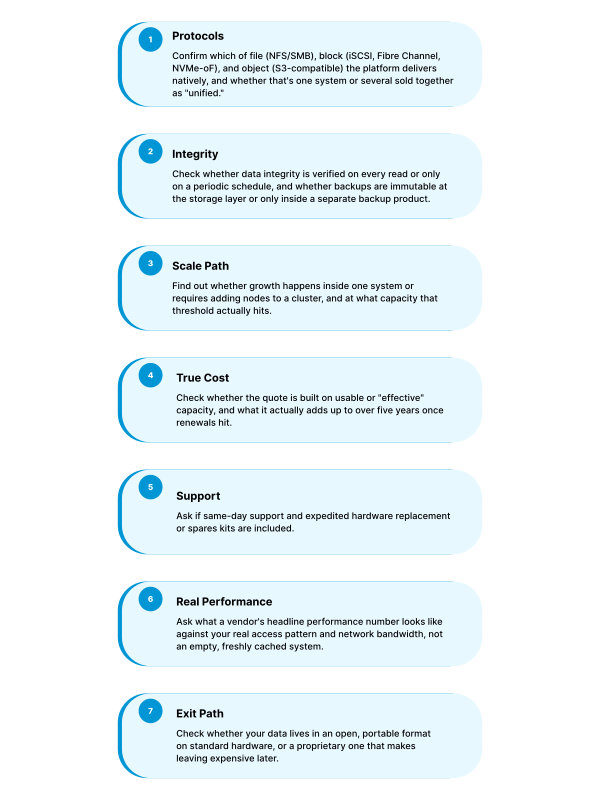
Here’s each of those in more detail.
What is unified storage?
Unified storage is a single platform that serves file, block, and object protocols together, instead of running a separate array for each. Some vendors deliver that from one system; others deliver it by selling two or three products under a shared marketing name, which is why it’s worth checking which one you’re actually being quoted before you compare prices.
1. Which protocols matter: SMB, NFS, iSCSI, NVMe-oF, and Fibre Channel
File protocols (NFS and SMB) serve files to clients and applications expecting a traditional file system. Block protocols (iSCSI, Fibre Channel, and NVMe-oF) serve raw block storage to databases, virtualization hosts, and other workloads that manage their own file layer. NVMe-oF specifically lets a host reach remote NVMe storage at very low latency, which matters for AI/ML training pipelines and other high-IOPS workloads. Object protocols (S3-compatible) serve backups, archives, and increasingly the data lakes behind AI training workloads.
The question worth asking isn’t which protocols appear on a spec sheet. It’s whether all of them come from one platform. NetApp splits file and block (ONTAP) from object storage, which runs on a separate product, StorageGRID, with its own management interface and its own support contract, whether it’s deployed on NetApp’s appliances or as software on your own infrastructure.
Dell’s split runs differently: PowerStore handles both block and file protocols on one platform, while large-scale unstructured data goes to a separate product, PowerScale, whose S3 access is a protocol layer on top of its file system rather than a distinct object store.
TrueNAS delivers file, block, and S3-compatible object storage from the same appliance, under the same support contract. None of these approaches is wrong. Splitting protocols across purpose-built platforms can mean stronger per-protocol performance; consolidating onto one platform means one system to manage and one contract to sign.
2. How vendors use terms like “unified” and “enterprise-ready”
These terms have no standard definition, so two vendors can use them for very different products. Gartner defines enterprise storage platforms as products designed to unify support for diverse block, file, and object storage workloads, managed through a centrally managed control plane. That’s a useful yardstick. Ask whether the system you’re being quoted serves every protocol you need from one platform, under one management interface and one support contract, or whether it’s several products under a shared name. For “enterprise-ready,” ask for the specifics behind the label, such as the uptime figure and which hardware configuration and support tier it requires.
3. The data protection checklist: snapshots, replication, and ransomware recovery
Four things decide whether “data protection” on a spec sheet actually protects anything.
- Integrity verification (CRC Checks). Enterprise storage usually gets evaluated on speed, capacity, and price, but none of those three tell you whether you can trust the data once it’s there. A system can stay online and backups can keep completing while a block of data quietly drifts from what was actually written, with nothing to flag it. Self-healing storage is built to catch exactly that: it verifies data against a stored checksum on every read and repairs any mismatch automatically, using redundant copies, instead of waiting for a scheduled scan to notice. OpenZFS, the filesystem underlying TrueNAS, does this on every block, every read, and TrueNAS has maintained a zero data loss record across 15+ years of production deployments as a result.
- Snapshot and replication design. Copy-On-Write (COW) snapshots capture only the changed blocks between two points in time, so they can run frequently without the storage overhead of a full copy, and replicate to a second system for off-site recovery.
- Ransomware and immutability posture. There’s more than one credible approach here. NetApp’s ARP/AI watches data inline as it’s written or read and automatically creates a new snapshot the moment it flags an anomaly. Dell’s “Cyber Detect” takes a different angle: deep content analysis across existing snapshots, checking hundreds of signals against thousands of known ransomware variants to identify which recovery point is still clean, available for PowerStore’s primary storage as well as the PowerProtect vault. TrueNAS takes a more structural approach: immutable OpenZFS snapshots and S3 Object Lock (WORM) built into the storage layer itself, so a compromised account can’t modify or delete existing snapshots regardless of what it does to live data. NIST SP 800-209, the federal government’s storage security guideline, is a reasonable independent standard to check any vendor’s data-protection and restoration claims against, rather than taking a vendor’s own description of “enterprise-ready” at face value.
- High Availability: When picking a storage platform, the real uptime figure matters more than the marketing number with the asterisk and disclaimers attached. It’s worth verifying with every vendor under consideration, to make sure the platform is actually built for continuous operation with little to no downtime.
4. Scale-up or scale-out: how enterprise storage actually grows
Scale-up means adding capacity or performance to a system you already have, typically by adding drives or expansion shelves to existing controllers. Scale-out means adding entire additional nodes to a cluster once a single system’s limits are reached, trading operational simplicity for a higher theoretical ceiling.
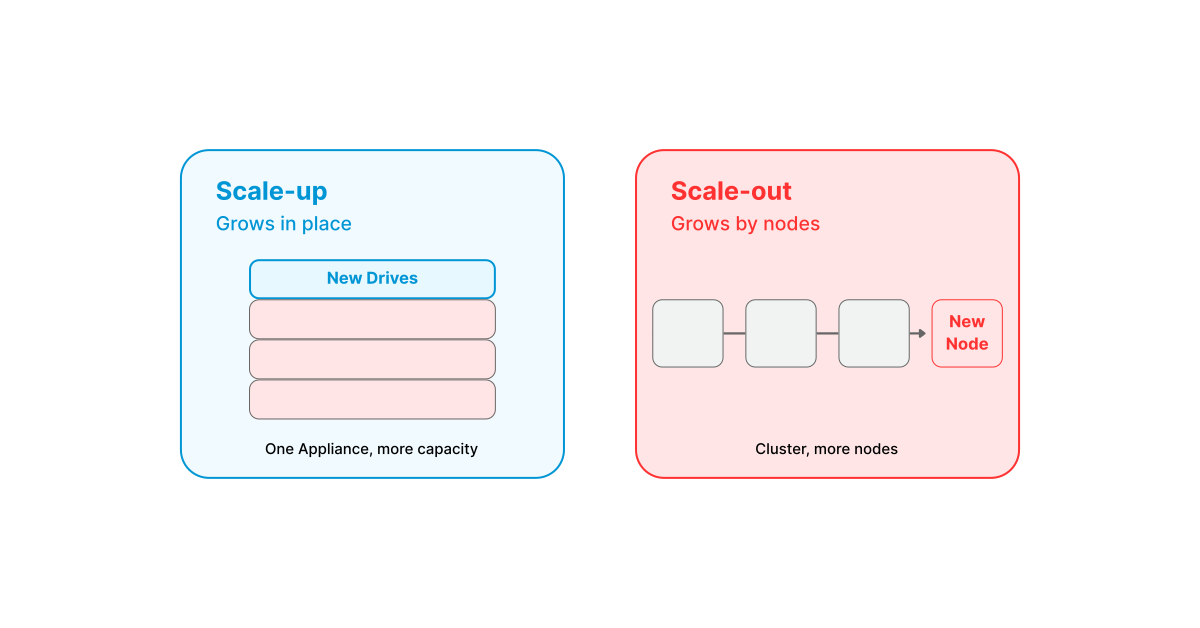
Dell PowerScale and NetApp’s ONTAP clusters both take the scale-out path: once a single node’s limits are reached, you cluster in additional nodes, up to 252 for PowerScale, up to 24 for an ONTAP cluster running file protocols. That introduces many moving parts and trades some operational simplicity for a ceiling that keeps rising as you add nodes. This is a real advantage for petabyte-plus deployments or workloads that specifically need to grow past what one system can hold.
TrueNAS Enterprise is built to scale up. It grows to up to 40PB raw in a single system without adding nodes to a cluster.
The real question isn’t which approach sounds more scalable. It’s whether a system that scales up can actually cover your capacity, expansion, and performance needs. If it can, it’s simpler to manage and more cost-effective than clustering in additional nodes to get there, worth checking before assuming you need scale-out at all.
5. How to budget for storage without leading with the sticker price
The number on a quote and the number you’ll actually pay over five years are often different. Four places that gap usually hides:
Upgrade costs. Ask what it actually takes to add capacity later, an entire shelf, an entire node, or a certain number of disks, and whether that price carries markup beyond component cost, or gets inflated once you’re already committed to the platform. Some vendors drop the initial price aggressively, then price the upgrade path once you’re locked in, worth surfacing before you sign, not after.
Capacity reporting. Ask whether the quoted capacity is raw, or “effective,” a figure derived by assuming a compression or deduplication ratio, often 5:1 or higher, that your actual data may not achieve.
Market timing. All-flash pricing is still climbing. TrendForce projects overall NAND contract prices to rise 15 to 20% in the fourth quarter, and expects enterprise SSD prices, the category all-flash arrays are built on, to rise faster than they did the quarter before, because most of the incremental supply is already committed. Confirm current pricing before you assume any quote still holds.
Renewal costs. A quote covering year one doesn’t tell you what year three costs once support and licensing renew. TrueNAS’s own published comparison against Dell PowerScale shows a 30%+ lower five-year TCO, calculated on raw, uncompressed capacity rather than an assumed compression ratio.
6. What to ask about support, before you sign
Every vendor claims their support never sleeps, and every vendor means something different by it. A few questions worth asking directly, before you sign:
- When a hardware component fails, what actually happens? Ask whether replacement is a separate process with its own paperwork, or handled by the same team working the case. With TrueNAS, hardware issues are diagnosed and, if a component has failed, turned into an RMA by the same support team handling the case.
- Once an issue is diagnosed, what’s the actual on-site commitment, in hours, not a phrase like “same-day”?
- Is remote deployment included, or billed separately? TrueNAS includes remote deployment with Gold, Silver, or Bronze support; on-site deployment is available as a separate option.
- Is support delivered directly by the platform vendor, or resold through a third party?
- What’s the migration path when it’s time for new hardware?
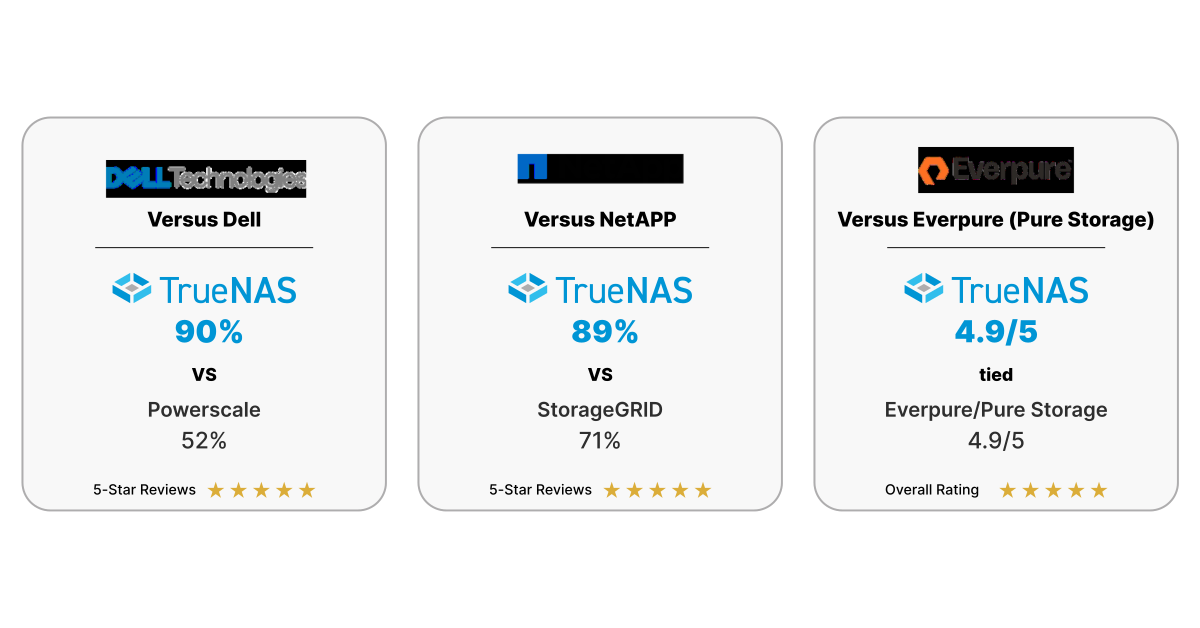
Rather than take any vendor’s word for its own support quality, check an independent source like Gartner Peer Insights, where actual customers, not the vendor, leave the rating. Against Dell PowerScale, TrueNAS shows a 90% five-star rate versus 52% for PowerScale on the same comparison. Against NetApp StorageGRID, it’s 89% versus 71%. Against Pure Storage, the two are tied around 4.9/5 apiece, worth digging into the review detail yourself if that’s the deciding factor.
7. How to evaluate performance claims
A vendor’s headline throughput or IOPS figure is usually measured under favorable conditions: sequential access, a fully cached working set, or a short burst window before sustained load sets in. Ask instead for numbers against your actual access pattern, random versus sequential, your real read/write mix, and at real capacity utilization, not on an empty system. Two platforms built on identical drives can perform very differently once an actual workload and real utilization enter the picture.
Network bandwidth per port matters just as much as the drives themselves, since it caps what you can actually move regardless of how fast the storage underneath is. Whatever the number, ask for it against your workload, not a spec sheet’s best case.
8. Migration and exit strategy
A quote never includes the cost of leaving, only the cost of staying. Two questions decide what that number actually is: does your data live in an open, portable format, or a proprietary one built to make switching painful, and does the hardware itself run on standard components, or does it lock you into one vendor’s ecosystem for the life of the deployment?
TrueNAS Enterprise runs on OpenZFS, which stores data in a standard, documented on-disk format instead of a proprietary one. That pool format isn’t tied to the specific appliance it was created on, it can be exported and imported on any system running compatible OpenZFS, so the data itself isn’t stranded if you ever move off the hardware it started on.
The vendor will make the pitch. Bring your own checklist.
Every storage vendor will hand you a confident set of numbers. Run the same seven criteria above against everyone on your shortlist instead of trusting whoever sounds most confident. Ready to hold a vendor to that standard? Start with what TrueNAS Enterprise publishes, or request a design review to run them against your own environment.
FAQ
What’s the difference between file storage and block storage?
File storage serves files over network protocols like NFS and SMB. Block storage delivers block-level access, typically over iSCSI or Fibre Channel, for workloads like databases and virtualization that need raw block access rather than a file-system layer. Many modern platforms, including TrueNAS, deliver both from the same system.
Should I choose scale-up or scale-out storage?
Scale-up keeps everything in one system and is simpler to operate, right up to that system’s ceiling. Scale-out trades some of that simplicity for a ceiling that keeps rising as you cluster in more nodes, which earns its complexity once you need petabyte-plus capacity or you’re running a workload built around a distributed pipeline like legacy HDFS. Check where a vendor’s single-system ceiling actually sits before assuming you need scale-out at all.
How does TrueNAS compare to Dell or NetApp on cost and support?
On published, non-compression-dependent pricing, TrueNAS Enterprise shows a 30%+ lower five-year TCO than Dell PowerScale below the 30PB threshold where TrueNAS’s scale-up architecture tops out. On independently collected Gartner Peer Insights reviews, TrueNAS holds a 90% five-star rate against Dell PowerScale’s 52%, and 89% against NetApp StorageGRID’s 71%.
How much should enterprise storage actually cost?
There’s no single number, total cost of ownership depends on capacity-reporting method, licensing model, and renewal terms, not just the year-one quote. The way to get a real answer is to ask every vendor you’re evaluating for the same things: raw, not effective, capacity pricing; a five-year total including renewals; and a written statement of what their uptime figure actually requires, which hardware configuration, which support tier, to hold.