<div class="bbWrapper">Hi,<br />
<br />
I just updated to 11.0-U4 and after that my raidz2 is in degraded state.<br />
The strange thing about this is all 5 disks are available.<br />
<br />
<div class="bbCodeBlock bbCodeCode"><div class="type">Code:</div><pre>camcontrol devlist
<ST4000DM000-1F2168 CC54> at scbus1 target 0 lun 0 (pass1,ada1)
<ST4000DM000-1F2168 CC54> at scbus2 target 0 lun 0 (pass2,ada2)
<ST4000DM000-1F2168 CC54> at scbus3 target 0 lun 0 (pass3,ada3)
<ST4000DM005-2DP166 0001> at scbus4 target 0 lun 0 (pass4,ada4)
<ST4000DM000-1F2168 CC54> at scbus5 target 0 lun 0 (pass5,ada5)
</pre></div><br />
<br />
<div class="bbCodeBlock bbCodeCode"><div class="type">Code:</div><pre> NAME STATE READ WRITE CKSUM
fileserver DEGRADED 0 0 0
raidz2-0 DEGRADED 0 0 0
gptid/3c38d05a-2ac4-11e7-97e2-001b21c1a8c0.eli ONLINE 0 0 0
gptid/3d2f6210-2ac4-11e7-97e2-001b21c1a8c0.eli ONLINE 0 0 0
gptid/3e53f7a2-2ac4-11e7-97e2-001b21c1a8c0.eli ONLINE 0 0 0
6114655274444198586 UNAVAIL 0 0 0 was /dev/gptid/3f7f0196-2ac4-11e7-97e2-001b21c1a8c0.eli
gptid/4076a268-2ac4-11e7-97e2-001b21c1a8c0.eli ONLINE 0 0 0
logs
gptid/885b2f74-2ce6-11e7-918f-001b21c1a8c0 ONLINE 0 0 0
cache
gptid/93074bd7-2ce6-11e7-918f-001b21c1a8c0 ONLINE 0 0 0</pre></div><br />
<br />
So why is my volume in degraded state in the first place and shall I just replace the UNAVAIL drive with the actual drive?<br />
<br />
FreeNAS-11.0-U4 (54848d13b)<br />
Intel(R) Core(TM) i5-3470S CPU @ 2.90GHz<br />
Memory 32713MB</div>
<div class="bbWrapper">What are you talking about? The fourth disk is not available. Unplug it and check, if it works put it back. I would have done.</div>
<div class="bbWrapper">Here's the smart output of the failed drive:<br />
<a href="https://paste.debian.net/990036/" target="_blank" class="link link--external" rel="nofollow ugc noopener">https://paste.debian.net/990036/</a></div>
<div class="bbWrapper"><blockquote data-attributes="member: 47951" data-quote="Peter Brille" data-source="post: 411901"
class="bbCodeBlock bbCodeBlock--expandable bbCodeBlock--quote js-expandWatch">
<div class="bbCodeBlock-title">
<a href="/community/goto/post?id=411901"
class="bbCodeBlock-sourceJump"
rel="nofollow"
data-xf-click="attribution"
data-content-selector="#post-411901">Peter Brille said:</a>
</div>
<div class="bbCodeBlock-content">
<div class="bbCodeBlock-expandContent js-expandContent ">
Here's the smart output of the failed drive:<br />
<a href="https://paste.debian.net/990036/" target="_blank" class="link link--external" rel="nofollow ugc noopener">https://paste.debian.net/990036/</a>
</div>
<div class="bbCodeBlock-expandLink js-expandLink"><a role="button" tabindex="0">Click to expand...</a></div>
</div>
</blockquote>You have never done a smart test on this drive. That's very negligent. Run a smart test I bet this drive will fail and while you are at it run smart short and long tests on all your drives. I hope you don't find out they are all failing.<br />
<br />
Read the manual.</div>
<div class="bbWrapper">Naively I thought FreeNAS would check smart for me and warn in the GUI if something is wrong.<br />
Well I compared my drives and I could see that there are two drives critical.<br />
Seek Error rates:<br />
ada1: 1,726,712,645,781<br />
ada2: 141,181,410<br />
ada3: 139,579,117<br />
ada4: 8,774,502,726<br />
ada5: 135,292,440<br />
<br />
Just ordered two replacement drives. Thanks for your help.</div>
<div class="bbWrapper">The RRER and SER on Seagate drives are expressed on a logarithmic scale, it's normal to have very high values in those fields.</div>
<div class="bbWrapper">A litte but important update.<br />
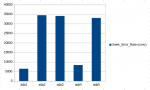
Seagate Seek Error rates (raw) need to be converted in order to get the actual value.<br />
<a href="http://www.users.on.net/~fzabkar/HDD/Seagate_SER_RRER_HEC.html" target="_blank" class="link link--external" rel="nofollow ugc noopener">http://www.users.on.net/~fzabkar/HDD/Seagate_SER_RRER_HEC.html</a><br />
What I did is convert the raw string to HEX, take the first 16 bits (i.e. 4 characters) and convert back to int.<br />
See my results attached.<br />
Just talked to someone who is responsible for hard disk in a datacenter. He told me that the most important values to detect a failing Seagate would be those:<br />
187 Reported_Uncorrect 0x0032 100 100 000 Old_age Always - 0<br />
5 Reallocated_Sector_Ct 0x0033 100 100 010 Pre-fail Always - 0<br />
197 Current_Pending_Sector 0x0012 100 100 000 Old_age Always - 0<br />
Those values state that there are no errors at all on the designated disk. So I have to assume that the disk is actually just fine.<br />
<br />
Any errors in my logic?</div>
<div class="bbWrapper"><blockquote data-attributes="member: 47951" data-quote="Peter Brille" data-source="post: 412156"
class="bbCodeBlock bbCodeBlock--expandable bbCodeBlock--quote js-expandWatch">
<div class="bbCodeBlock-title">
<a href="/community/goto/post?id=412156"
class="bbCodeBlock-sourceJump"
rel="nofollow"
data-xf-click="attribution"
data-content-selector="#post-412156">Peter Brille said:</a>
</div>
<div class="bbCodeBlock-content">
<div class="bbCodeBlock-expandContent js-expandContent ">
A litte but important update.<br />
Seagate Seek Error rates (raw) need to be converted in order to get the actual value.<br />
<a href="http://www.users.on.net/~fzabkar/HDD/Seagate_SER_RRER_HEC.html" target="_blank" class="link link--external" rel="nofollow ugc noopener">http://www.users.on.net/~fzabkar/HDD/Seagate_SER_RRER_HEC.html</a><br />
What I did is convert the raw string to HEX, take the first 16 bits (i.e. 4 characters) and convert back to int.<br />
See my results attached.<br />
Just talked to someone who is responsible for hard disk in a datacenter. He told me that the most important values to detect a failing Seagate would be those:<br />
187 Reported_Uncorrect 0x0032 100 100 000 Old_age Always - 0<br />
5 Reallocated_Sector_Ct 0x0033 100 100 010 Pre-fail Always - 0<br />
197 Current_Pending_Sector 0x0012 100 100 000 Old_age Always - 0<br />
Those values state that there are no errors at all on the designated disk. So I have to assume that the disk is actually just fine.<br />
<br />
Any errors in my logic?
</div>
<div class="bbCodeBlock-expandLink js-expandLink"><a role="button" tabindex="0">Click to expand...</a></div>
</div>
</blockquote>Yes, you didn't run a smart test. That's literally all you have to do. No converting no understanding values just pass or no pass. And yes FreeNAS does this automatically and will email you and flash in the GUI if something goes wrong. You just have to set it up.</div>
<div class="bbWrapper"><blockquote data-attributes="member: 34238" data-quote="SweetAndLow" data-source="post: 412170"
class="bbCodeBlock bbCodeBlock--expandable bbCodeBlock--quote js-expandWatch">
<div class="bbCodeBlock-title">
<a href="/community/goto/post?id=412170"
class="bbCodeBlock-sourceJump"
rel="nofollow"
data-xf-click="attribution"
data-content-selector="#post-412170">SweetAndLow said:</a>
</div>
<div class="bbCodeBlock-content">
<div class="bbCodeBlock-expandContent js-expandContent ">
And yes freenas does this automatically and will email you and flash in the GUI if something goes wrong. <b>You just have to set it up.</b>
</div>
<div class="bbCodeBlock-expandLink js-expandLink"><a role="button" tabindex="0">Click to expand...</a></div>
</div>
</blockquote>...and that's the key, and FreeNAS really should set a default SMART test schedule, but it doesn't.</div>
<div class="bbWrapper">I think the devs are open to changing that, though. I don't think anybody actually filed a feature request, though. I'd probably add a few things in a single SMART overhaul ticket.</div>
<div class="bbWrapper">At least with 11-RC3, there was a default--short tests every hour on Sundays, and nothing else. <a href="https://bugs.freenas.org/issues/24217" target="_blank" class="link link--external" rel="nofollow ugc noopener">https://bugs.freenas.org/issues/24217</a><br />
<br />
There's a bit of discussion there of a default SMART test schedule, but not much. A former bug (<a href="https://bugs.freenas.org/issues/8415" target="_blank" class="link link--external" rel="nofollow ugc noopener">https://bugs.freenas.org/issues/8415</a>) suggested a default SMART test schedule, and was shot down.</div>
<div class="bbWrapper">It could be one of the questions in the setup wizard. "Do you want to set up some SMART tests? Yes/No?" That way the user isn't forced to run a SMART test if they despise SMART tests.</div>
<div class="bbWrapper">If they actively hate them then they can hunt down how to disable them. Other people who don't care will just get them for free.</div>
<div class="bbWrapper">I ran a long self test via smartctl yesterday on all disks without any errors. I will replace the missing disk with the actual disk now.<br />
The initial question why my volume got degraded in the first place is still unanswered though.</div>
<div class="bbWrapper"><blockquote data-attributes="member: 47951" data-quote="Peter Brille" data-source="post: 412400"
class="bbCodeBlock bbCodeBlock--expandable bbCodeBlock--quote js-expandWatch">
<div class="bbCodeBlock-title">
<a href="/community/goto/post?id=412400"
class="bbCodeBlock-sourceJump"
rel="nofollow"
data-xf-click="attribution"
data-content-selector="#post-412400">Peter Brille said:</a>
</div>
<div class="bbCodeBlock-content">
<div class="bbCodeBlock-expandContent js-expandContent ">
I ran a long self test via smartctl yesterday on all disks without any errors. I will replace the missing disk with the actual disk now.<br />
The initial question why my volume got degraded in the first place is still unanswered though.
</div>
<div class="bbCodeBlock-expandLink js-expandLink"><a role="button" tabindex="0">Click to expand...</a></div>
</div>
</blockquote>You had a hardware failures of some kind. Or at least that should be the first thing you check. You didn't provide very good hardware info so we can't give you any ideas of what to look at next. Let us know if you figure it out.</div>