






TrueNAS
Products
Support & Resources
Solutions
Company
Sign In

Configuring S3 Object Storage

S3 object storage lets S3 clients, such as backup applications, store and retrieve data in buckets on the TrueNAS system. Setting up S3 object storage involves these tasks:

  1. Configure the S3 service.
  2. Create an S3 access key for each client.
  3. Add an S3 bucket and start the S3 service.
  4. Connect the S3 client to the bucket.

To let a client create its own buckets, see Allowing Clients to Create Buckets. To use a bucket as an immutable backup target, see Adding an Object-Locked Bucket for a Backup Target.
Read full post gdoc_arrow_right_alt

S3 Buckets Screens

The S3 bucket screens and the Object Storage (S3) Buckets card on the Shares screen show the S3 buckets on the system and the options to add, edit, and delete buckets.

Object Storage (S3) Buckets card

The Object Storage (S3) Buckets card on the Shares screen shows general information about S3 object storage until you add a bucket.

Read full post gdoc_arrow_right_alt

S3

TrueNAS can serve object storage over the Simple Storage Service (S3) protocol. S3 is the application programming interface (API) that Amazon Web Services created for its object storage service. Many storage products and applications now use the S3 API as a standard way to store and retrieve data, and products that support it are often called S3-compatible. TrueNAS provides S3-compatible object storage on the local system and does not use Amazon services.

Read full post gdoc_arrow_right_alt

S3 Access Keys Screen

The Credentials > S3 Access Keys screen shows the access keys S3 clients use to connect to S3 buckets on the TrueNAS system.

An S3 access key is a credential pair made up of an access key ID and a secret access key. S3 clients use the pair to sign each request with AWS Signature Version 4 (SigV4), the standard authentication method for the S3 API. Each access key belongs to a TrueNAS user account, and the S3 service runs requests signed with that key as that user. An S3 access key cannot sign in to the TrueNAS web UI or API.

Read full post gdoc_arrow_right_alt

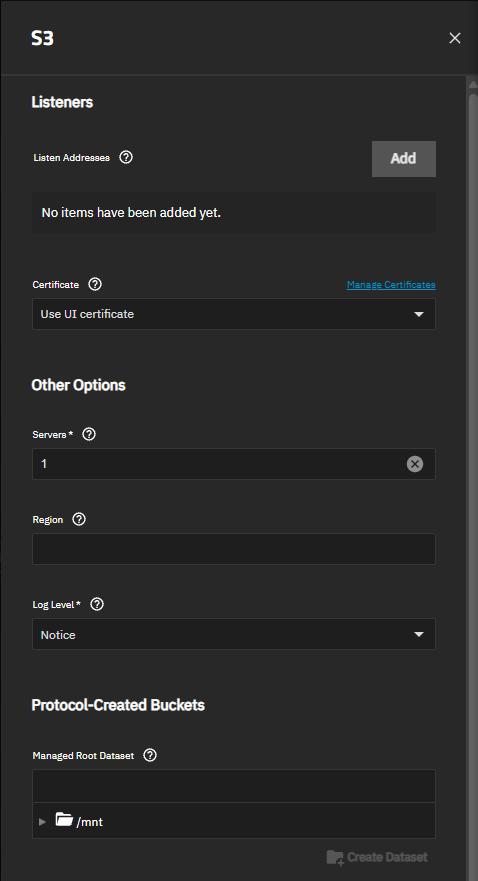
S3 Service Screen

The S3 service screen shows settings to configure where the S3 service listens for client requests, the certificate for encrypted connections, and service-wide options that apply to every bucket.

To open the screen, go to Shares, click the more_vert icon on the Object Storage (S3) Buckets card, and then select Config Service.

Changing the listen addresses, the number of servers, or the region restarts the S3 service. A restart waits up to 30 seconds for client requests in progress to finish. Other changes apply without a restart.

Read full post gdoc_arrow_right_alt