




TrueNAS Development Documentation
This content follows experimental development changes in TrueNAS 28, a future version of TrueNAS.
Use the Product and Version selectors above to view content specific to a stable software release.
S3 Service Screen
5 minute read.
The S3 service screen shows settings to configure where the S3 service listens for client requests, the certificate for encrypted connections, and service-wide options that apply to every bucket.
To open the screen, go to Shares, click the icon on the Object Storage (S3) Buckets card, and then select Config Service.
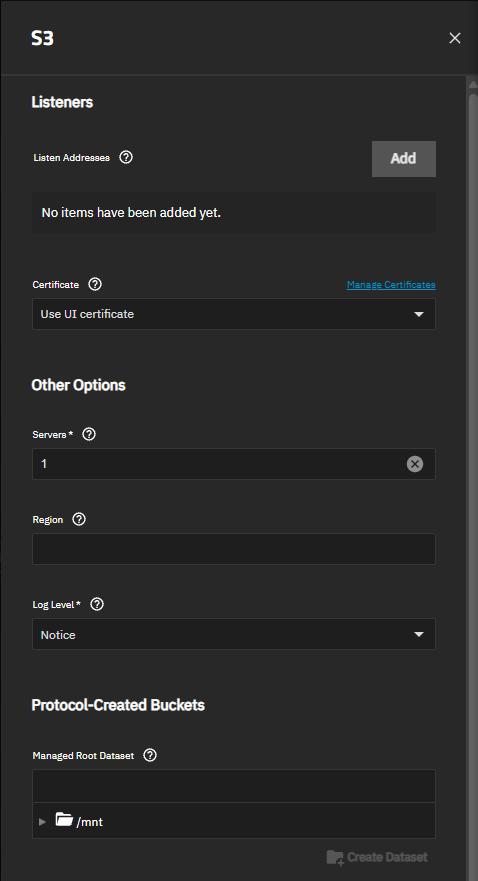
Changing the listen addresses, the number of servers, or the region restarts the S3 service. A restart waits up to 30 seconds for client requests in progress to finish. Other changes apply without a restart.
Save applies the settings.
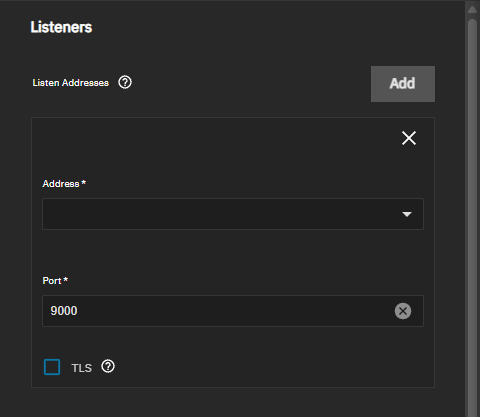
The Listeners settings select the IP addresses and ports the S3 service listens on, and the certificate for listeners that use TLS.
The Other Options settings configure service performance, the region name, and logging.
The Protocol-Created Buckets setting allows S3 clients to create buckets.
Click Here for More Information
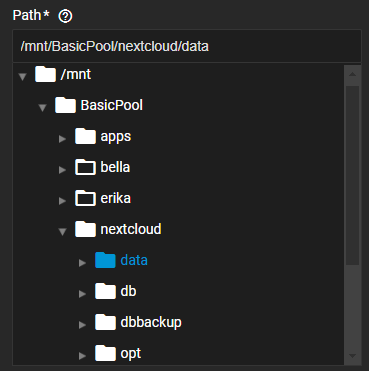
| Setting | Description |
|---|---|
| Managed Root Dataset | Select the dataset where TrueNAS creates a dataset for each bucket that an S3 client creates. The dataset must already exist. Create Dataset opens a dialog to create a dataset under the selected dataset. Leave empty to refuse bucket creation requests from S3 clients. Buckets you add from the Shares screen use the Parent Dataset you select instead. A client can only create buckets with an access key that has Manage Buckets selected. |
The Global Grants setting applies grants to every bucket on the system.
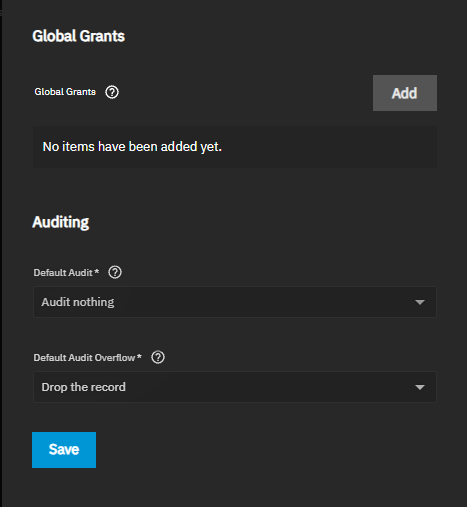
The Auditing settings set the default audit behavior for buckets that do not set their own. S3 auditing is a licensed feature. The section shows a Premium tag when the system license does not include it.
Amazon S3 is a trademark of Amazon.com, Inc. or its affiliates.