




TrueNAS Development Documentation
This content follows experimental development changes in TrueNAS 28, a future version of TrueNAS.
Use the Product and Version selectors above to view content specific to a stable software release.
Configuring NFS Service
4 minute read.
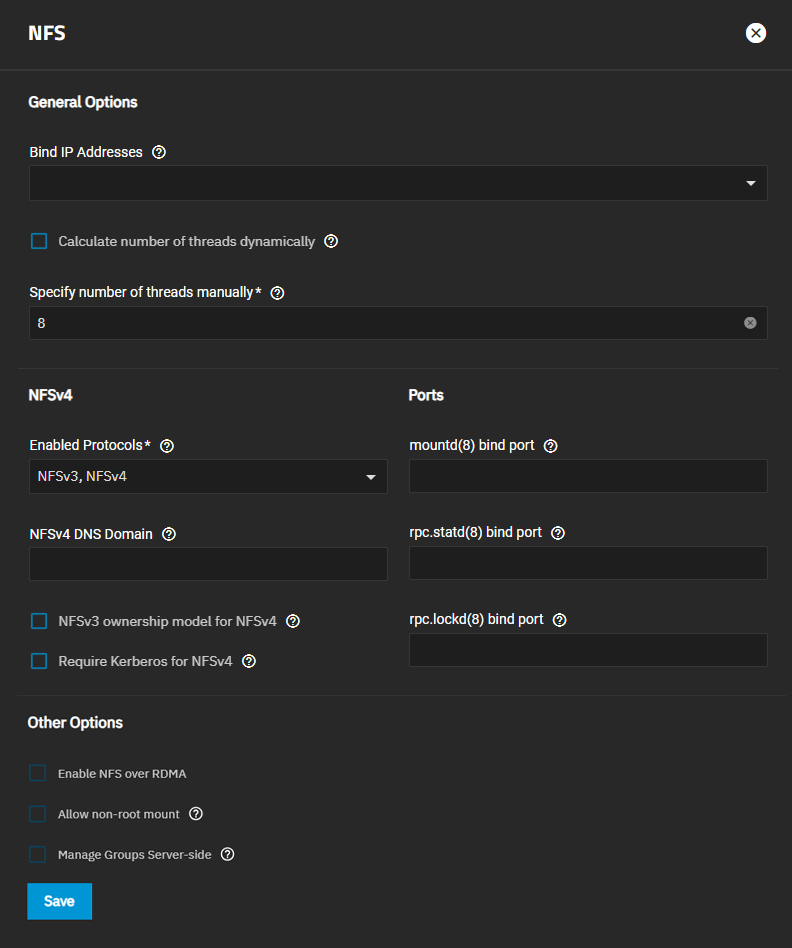
The Services > NFS configuration screen displays settings to customize the TrueNAS NFS service.
Go to System > Services screen, locate NFS, and click edit to open the screen, or use the Config Service option on the Unix (NFS) Share widget options menu found on the main Sharing screen.
Select Start Automatically to activate the NFS service when TrueNAS boots.
We recommend using the default NFS settings unless you require specific settings.
Select the IP address from the Bind IP Addresses dropdown list to use a specific static IP address, or leave this field blank for NFS to listen to all available addresses.
By default, TrueNAS dynamically calculates the number of threads the kernel NFS server uses. To manually enter an optimal number of threads the kernel NFS server uses, clear Calculate number of threads dynamically and enter the number of threads you want in the Specify number of threads manually field.
If using NFSv4, select NFSv4 from Enabled Protocols. NFSv3 ownership model for NFSv4 clears, allowing you to enable or leave it clear. Selecting NFSv3 ownership model for NFSv4 deactivates the Manage Group Server-side option.
To force NFS shares to fail if the Kerberos ticket is unavailable, select Require Kerberos for NFSv4.
Next, enter a port to bind to in the field that applies:
- Enter a port to bind mountd(8) in mountd(8) bind port.
- Enter a port to bind rpc.statd(8)in rpc.statd(8) bind port.
- Enter a port to bind rpc.lockd(8) in rpc.lockd(8) bind port.
The UDP protocol is deprecated and not supported with NFS. It is disabled by default in the Linux kernel. Using UDP over NFS on modern networks (1Gb+) can lead to data corruption caused by fragmentation during high loads.
Only select Allow non-root mount if the NFS client requires it to allow serving non-root mount requests.
Select Manage Groups Server-side to allow the server to determine group IDs based on server-side lookups rather than relying solely on the information provided by the NFS client.
This can support more than 16 groups and provide more accurate group memberships.
It is equivalent to setting the --manage-gids flag for rpc.mountd.
This setting assumes group membership is configured correctly on the NFS server.
Changes to local groups or directory service groups take up to 10 minutes to take effect for NFS shares. For immediate effect, reload or restart the NFS service.
Click Save.
Start the NFS service. When TrueNAS is already connected to Active Directory, setting NFSv4 and Require Kerberos for NFSv4 also requires a Kerberos Keytab.
TrueNAS allows configuring a Service Principal Name (SPN) on the NFS service screen when TrueNAS is joined to Active Directory, AD is healthy in TrueNAS, and when NFSv4 is selected in Enabled Protocols and Require Kerberos for NFSv4 is enabled.
After setting up the NFS service and saving changes, open the NFS service screen again to see Add SPN active at the bottom of the screen to the right of Save.
Click Add SPN to open the first of two dialogs. Select Yes on the first Enable Kerberos SPN Entry dialog to open the second dialog.
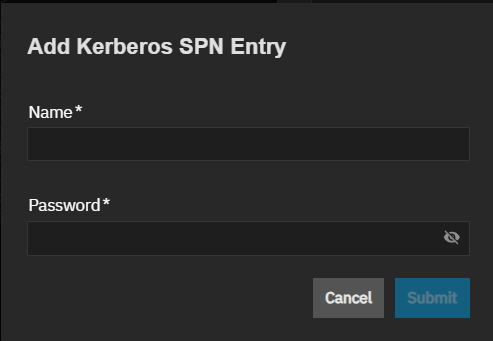
Enter the AD admin account name and password for that account, then click Submit.
Authentication is against the AD account and not the TrueNAS administrator account in the TrueNAS database. AD owns the SPN, not TrueNAS.