




TrueNAS Development Documentation
This content follows experimental development changes in TrueNAS 28, a future version of TrueNAS.
Use the Product and Version selectors above to view content specific to a stable software release.
Capacity Settings Screen
1 minute read.
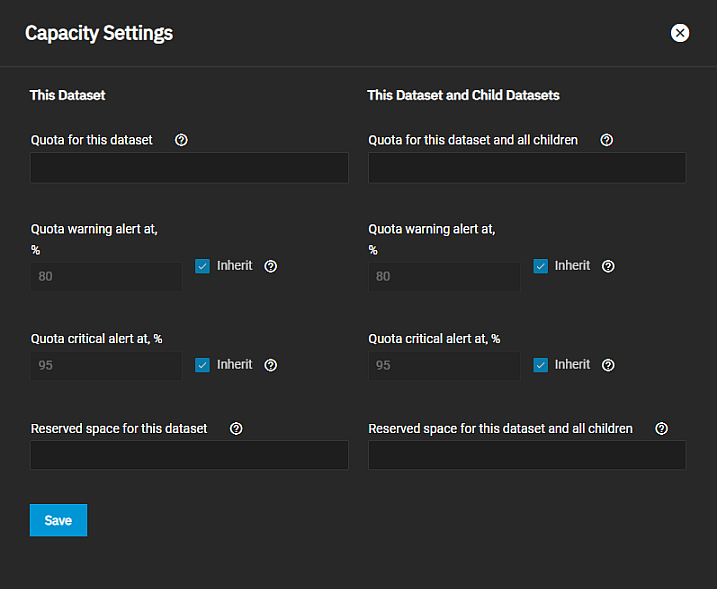
The Capacity Settings screen allows users to add or edit existing quotas for the selected dataset and any of the child datasets for the selected dataset apart from the dataset creation process.
The settings on the Capacity Settings screen are the same as those in the quota management section on the Add Dataset > Advanced Options screen.
| Setting | Description |
|---|---|
| Quota for this dataset Quota for this dataset and all children | Sets the maximum allowed space for dataset. 0 disables quotas. # the same for This Dataset and the This Dataset and Child Datasets fields. |
| Quota warning alert at, % | Sets the percentage value to generate a warning level alert when consumed space reaches the defined level. By default, the dataset inherits this value from the parent dataset. Clear the Inherit checkbox to change the value. |
| Quota critical alert at, % | Sets the percentage value to generate a critical level alert when consumed space reaches the defined level. By default, the dataset inherits this value from the parent dataset. Clear the Inherit checkbox to change the value. |
| Reserved space for this dataset Reserved space for this dataset and all children | Sets a reserve of additional space for datasets that contain logs that could eventually take up all the available free space. 0 is unlimited. |