


TrueNAS Early Release Documentation
This content follows TrueNAS 27 releases.
Use the Product and Version selectors above to view content specific to a stable software release.
Creating Pools
12 minute read.
TrueNAS uses ZFS data storage pools to efficiently store and protect data.
We strongly recommend that you review your available system resources and plan your storage use case before creating a storage pool. Considerations:
- Allocating more drives to a pool increases redundancy when storing critical information.
- Maximizing total available storage at the expense of redundancy or performance entails allocating large-volume disks and configuring a pool for minimal redundancy.
- Maximizing pool performance entails installing and allocating high-speed SSD drives to a pool.
RAIDz pool layouts are well-suited for general use cases and especially smaller (<10) data VDEVS or storage scenarios that involve storing multitudes of small data blocks.
dRAID pool layouts are useful in specific situations where large disk count (>100) arrays need improved resilver times due to increased disk failure rates and the array is intended to store large data blocks.
TrueNAS recommends defaulting to a RAIDz layout generally and whenever a dRAID vdev would have fewer than 10 data storage devices.
Beyond the data VDEV layout, consider whether your workload benefits from optional VDEV types such as cache, log, and special VDEVS.
- Cache VDEVs extend read cache (L2ARC) using SSD, which can be a more cost-effective way to improve random-read performance for large working datasets than adding system RAM, especially given the current cost of memory. See L2ARC for details on when L2ARC helps and how to size it.
- Log VDEVs accelerate synchronous writes using a dedicated SLOG device, which is useful for workloads with heavy sync-write activity (databases, some VM/iSCSI use cases).
- Special VDEVs store metadata, and optionally, small file data on faster storage, which improves overall pool responsiveness.
Determining your specific storage requirements is a critical step before creating a pool. Include the alternative VDEV options in your data VDEV layout, since adding them after pool creation has more limitations than configuring them up front.
The ZFS and dRAID primers provide a starting point to learn about the strengths and costs of different storage pool layouts. You can also use the ZFS Capacity Calculator and ZFS Capacity Graph to compare configuration options.
Security requirements can mean the data must be protected with additional encryption.
Encrypting the root dataset (pool-level encryption) creates a single point of failure. Losing one key makes the entire pool inaccessible.
Best practice Do not enable encryption during pool creation. Instead, create an unencrypted pool with individually encrypted datasets and zvols. This allows independent key management, selective unlock, isolated failures, and simplified recovery.
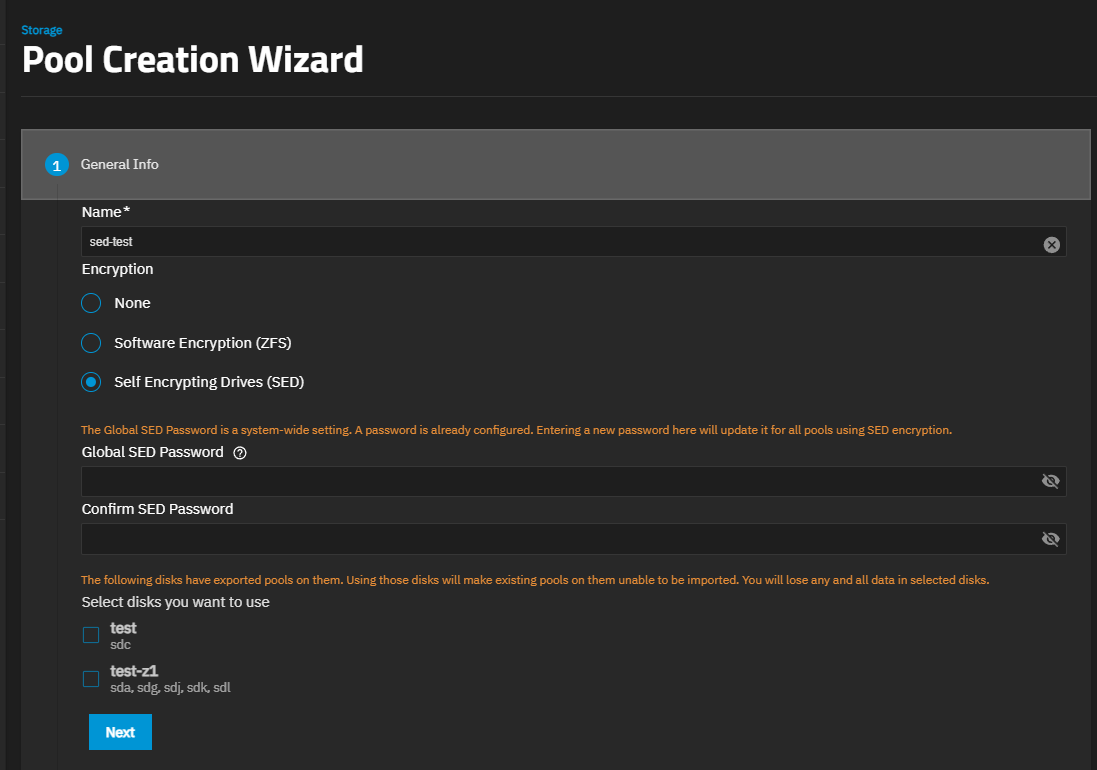
Click Create Pool to open the Pool Creation Wizard.
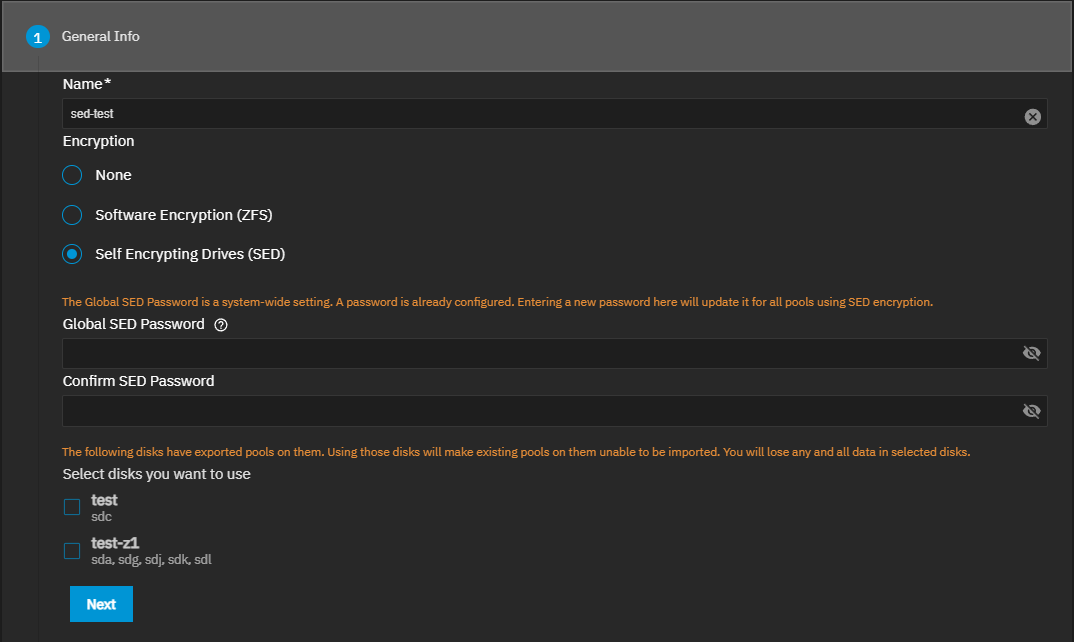
Enter a name of up to 50 lowercase alpha-numeric characters. The pool name contributes to the maximum character length for datasets, so it is limited to 50 characters. Use only the permitted special characters that conform to ZFS naming conventions. Names can have upper or lowercase alphanumeric characters, but use lower-case alpha characters to avoid potential problems with sharing protocols. Names can have special characters such as underscore (_), hyphen (-), colon (:), or a period (.), but do not begin a pool name with a special character.
You cannot change the pool name after creation.Select the encryption option for the pool. Select None to create an unencrypted pool. We recommend not encrypting the pool root dataset or the system dataset. If creating a second pool on your system and you want to encrypt this pool, select Software Encryption (ZFS). All datasets created with this option selected are also encrypted by default.
TrueNAS EnterpriseIf your Enterprise system is licensed for and has SED drives, you can select Self-Encrypting Drives (SED) to create a pool with SED drives and encryption. You can only select SEDs when using Self-Encrypting Drives (SED) encryption.
Enter and confirm the global SED password. This applies to all SED drives in the system.
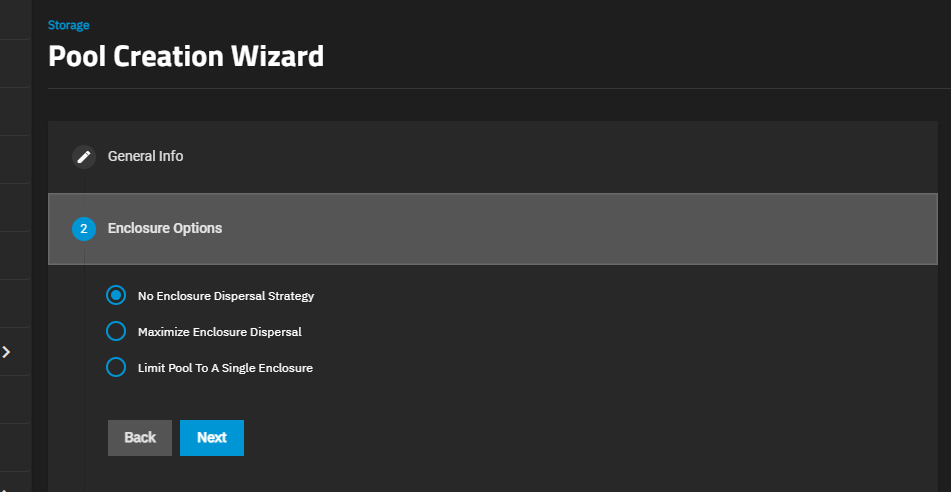
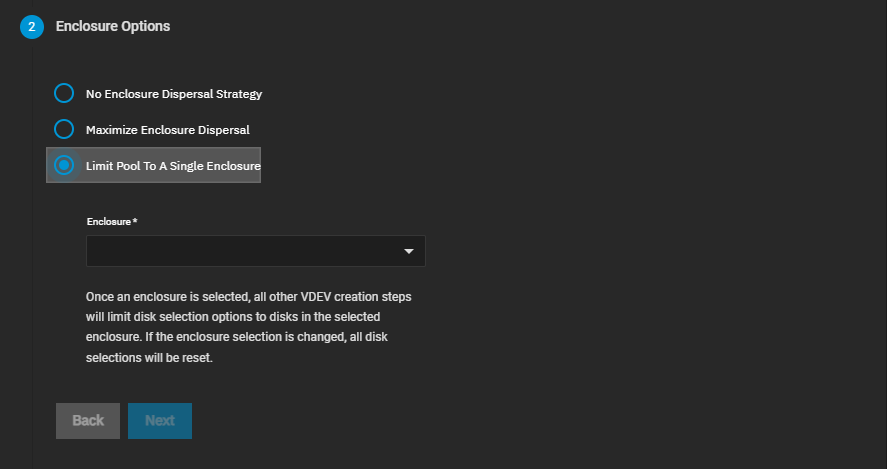
(Enterprise systems only) Select the Enclosure Option to apply the dispersal strategy of your choice.
Enclosure Option only shows for TrueNAS Enterprise systems with connected expansion shelves.
You can rename your enclosure on the Enclosure screen to include the rack and U number in the name, which helps identify the physical location while in the pool creation screen.The dispersal strategy sets how the system adds disks by size and type to the pool VDEVs created using the Automated Disk Selection option. Enclosures mentioned in the options below refer to the disk enclosures in the expansion shelves and main system chassis.
No Enclosure Dispersal Strategy does not apply a dispersal strategy and does not show additional options. Disks added to the pool VDEVs are assigned in sequence based on disk availability and are not balanced across all enclosures.
Maximum Dispersal Strategy applies a maximum dispersal strategy. This option balances disk selection across all enclosures and available disks and does not show additional options. Disks added to the pool VDEVs are spread across all available enclosure disks.
Limit Pool To A Single Enclosure applies a minimum dispersal strategy. Select the expansion shelf option on the Enclosure dropdown. Disks added to the pool VDEVs are spread across the enclosure disks that align with the selection in Enclosure.
Create the required data VDEV.
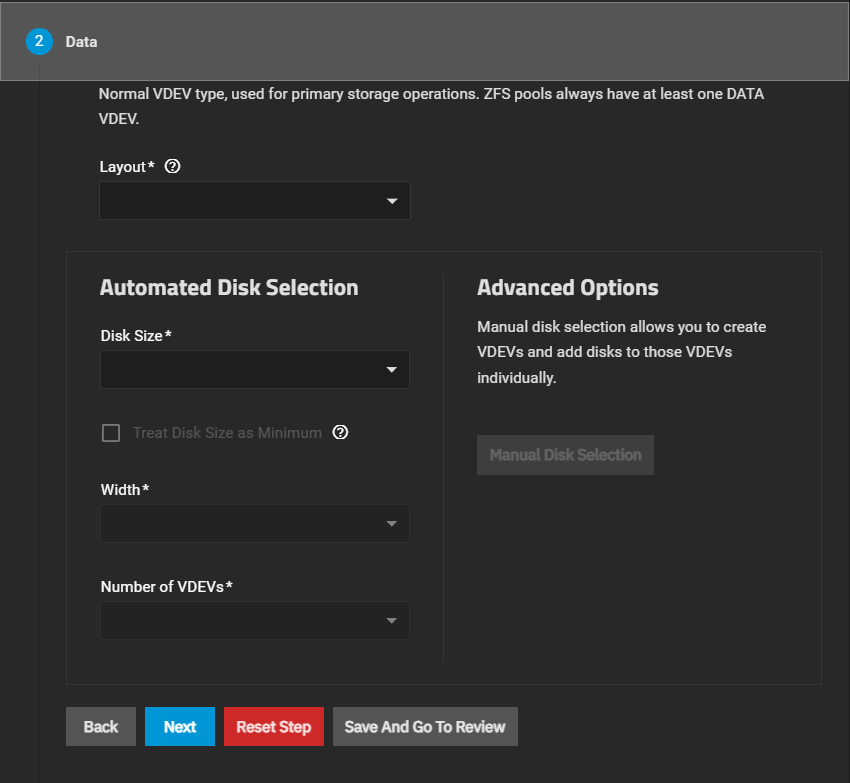
Pool Creation Wizard Data VDEV
This wizard screen lets you configure a VDEV using the Automated Disk Selection fields. To individually find and select disks for a VDEV, click Manual Disk Selection in the Advanced Options area.
Choosing a dRAID VDEV layout removes the Manual Disk Selection button and adds different options to the Automated Disk Selection area. It also removes the Spare VDEV section from the pool creation wizard and replaces it with the Distributed Hot Spares option in the Data VDEV section.
The Layouts field shows the following options:
Stripe
Designates that each disk is used sequentially in the VDEV. Requires at least one disk and has no redundancy. A data VDEV with a stripe layout irretrievably loses all stored data if a single disk in the VDEV fails. Not recommended for data VDEVs storing critical data.
Mirror
Denotes that each disk in the VDEV stores an exact copy of the data. Requires at least two disks in the VDEV. Storage capacity is the size of a single disk in the VDEV.
RAIDZ and dRAID
Each of these layouts has 1, 2, and 3 options. The options indicate the number of disks reserved for data parity and the number of disks that can fail in the VDEV without data loss to the pool. For example, a RAIDZ2 layout reserves two additional disks for parity, and two disks can fail without data loss.
Spare
Designates one or more disks to be held in reserve for the pool, ready to automatically replace a failed disk in a data VDEV. Spare disks are not part of normal pool capacity and do not store data unless activated to replace a failed disk. Not available when using a dRAID data VDEV layout. dRAID uses distributed hot spares within the data VEDV instead.
Cache
Designates one or more disks (typically SSDs) used as a second-level adaptive replacement cache (L2ARC) to extend the read cache of a pool beyond system RAM (ARC). Cache disks are always striped and do not provide redundancy. A cache VDEV failure does not affect pool data integrity. Refer to the L2ARC article for more information on how L2ARC uses this VDEV, write-algorithm behaviour, and device recommendations.
Special (Metadata)
Designates one or more disks (typically SSDs) used to store pool metadata and, optionally, small file data. This offloads it from the slower data VDEV to improve performance. Special VDEVs can use a stripe, mirror, or RAIDz layout, with the same parity rules applied for RAIDz options. Special VDEVs do not support dRAID, and must tolerate at least as many drive failures as the data VDEV. Using two or more special VDEVs can improve reliability by storing each metadata copy on a different VDEV. The Use Metadata (Special) VDEVs threshold (special_small_blocks) controls which file data, by size, is stored on the special VDEV instead of the data VDEV. This supports manual storage tiering on a per-dataset basis. Note: if a dedicated log VDEV does not exist in the pool, a special VDEV can also serve the ZIL/SLOG role for synchronous writes. We recommend matching the special VDEV redundancy level to the data VDEV, since losing a non-redundant special VDEV can make the entire pool inaccessible.
Log
Designates one or more disks (typically fast SSDs or NVMe) to use as a dedicated ZFS Intent Log (SLOG) to accelerate synchronous write operations. Log disks do not store pool data permanently; rather they hold write transactions briefly before ZFS commits them to the pool and are only read back during an unclean shutdown or crash recovery. We recommend mirroring the log VDEV for redundancy. A failed, non-mirrored log VDEV can risk losing recent synchronous writes that are not yet committed to the pool.
<!-- comment out the setting automation tag {id="pool_create_auto-select"} -->Setting Description Disk Size Select the disk size from the list that displays. The list shows disks by size in GiB and type (SSD or HDD). Treat Disk Size as Minimum Select to use disks of the size selected in Disk Size or larger. If not selected, only disks of the size selected in Disk Size are used. Width Select the number of disks from the options provided on the dropdown list. Number of VDEVs Select the number of VDEVs from the options provided on the dropdown list. Similar to RAIDZ, dRAID layout numbers (1, 2, or 3) indicate the parity level and how many disks can fail without data loss to the pool.
TrueNAS defaults to allocating a minimum of 10 disks as dRAID VDEV in Children. If creating a data VDEV with fewer than 10 disks, using a RAIDZ layout is strongly recommended for better performance and capacity optimization.
Setting Description Treat Disk Size as Minimum Select to use disks of the size selected in Disk Size or larger. If not selected, only disks of the size selected in Disk Size are used. Data Devices Data stripe width for the VDEV. Select the number of disks from the options provided on the dropdown list. TrueNAS recommends that dRAID layouts have data devices allocated in multiples of two. Distributed Hot Spares Number of disk areas to actively provide spare capacity to the entire VDEV. These areas are active within the pool and function in of adding a Spare VDEV to the pool. We recommend setting this to at least 1. The Distributed Hot Spares number cannot be modified after the pool is created. Children The total number of disks to allocate in the dRAID VDEV. The field selection and options update dynamically based on the chosen dRAID Layout, Disk Size, Data Devices, and Distributed Hot Spares. Increasing the number of Children in the dRAID VDEV can reduce the options for Number of VDEVs. Number of VDEVs Select the number of VDEVs from the options provided on the dropdown list. Options are populated dynamically depending on the selections made in all the other fields. Select the layout from the Layout dropdown list, then use the Automated Disk Selection fields to select and add the disks, or click Manual Disk Selection to add specific disks to the chosen Layout.
dRAID layouts do not show the Manual Disk Selection button but do show additional Automated Disk Selection fields. When configuring a dRAID data VDEV, first, choose a Disk Size then select a Data Devices number. The remaining fields update based on the Data Devices and dRAID layout selections.
ZFS allows groups to span multiple rows, which means it does not require each row to contain a whole number of redundancy groups. This layout has several advantages over requiring whole groups in each row:
- Group count - Group count is not a relevant parameter when defining a dRAID layout. ZFS only needs the group width and all groups will have the desired size.
- Group widths - ZFS can support all possible group widths (greater than or equal to the physical disk count).
ZFS determines the number of groups by the least common multiple (LCM) of the group width (D+P) and the number of physical drives minus spares (C-S). The logic within dRAID is simplified when the group width is the same for all groups, although some aspects, such as computing permutation numbers and drive offsets, are more complex. This flexible layout ensures even distribution of data and parity while maintaining high performance and resilvering efficiency.
See vdev_draid.c for more information.
Click Save And Go To Review if not adding other VDEV types to the pool or click Next to move forward to the next wizard screen.
Add optional VDEVs to suit your storage redundancy and performance requirements.
Cache VDEV considerations:
- Multiple devices reduce latency. Adding more than one cache device lets L2ARC reads spread across them, improving performance over a single device.
- Device speed matters more than capacity. A cache device that is significantly faster than your data storage devices makes better use of its capacity for sequential or streaming workloads, prioritizes low-latency, and high-throughput devices like Enterprise-grade NVMe.
- Size relative to ARC. L2ARC is most effective for random read-heavy workloads where the working dataset exceeds available RAM (ARC) but fits in the cache VDEV. An undersized cache device relative to your dataset provides limited benefit.
- Redundancy not needed. Cache VDEVs are always striped. A failed cache device does not affect pool data integrity, so mirroring is unnecessary.
See L2ARC for more information on L2ARC behavior and how write rates are managed.
Spare VDEV consideration:
- Manual replacement versus dedicated spare. Relying on alerts and manually replacing a failed disk is an option instead of dedicating a disk as a spare. dRAID uses distributed hot spares, so adding a spare VDEV is not needed for dRAID layouts.
Log VDEV consideration:
- Supports planned sync-write-heavy workloads, such as for databases, VM, or iSCSI uses. Use a mirror layout for redundancy.
Special VDEV considerations:
- Fusion pool metadata performance tradeoff. Special VDEVs move metadata (and optional small files, via special_small_blocks) off the slower data VDEV onto the faster storage, which is the point of a fusion pool. Special VDEVs must tolerate at least as many drive failures as the data VDEV, and do not support dRAID layouts.
- Redundancy-matching versus the risk of not giving the special VDEV redundancy matching your data VDEV, which can result in making the entire pool inaccessible!
Click Create Pool on the Review wizard screen to add the pool.