







TrueNAS Stable Version Documentation
This content follows TrueNAS 25.10 (Goldeye) releases.
Use the Product and Version selectors above to view content specific to a different software release.
Managing the System Configuration
7 minute read.
TrueNAS allows users to manage the system configuration by uploading or downloading configurations or by resetting the system to the default configuration.
The Manage Configuration option on the System > Advanced Settings screen provides three options:
- Download File that downloads your system configuration settings to a file on your system.
- Upload File that allows you to upload a replacement configuration file.
- Reset to Defaults resets system configuration settings back to factory settings.
The Download File option downloads your TrueNAS current configuration to the local machine.
A system config file is a database file containing your settings, including accounts, directory services, networking, services, shares, storage configuration, system settings, data protection tasks, and more.
In TrueNAS 25.04 (and later), users must log in as a system administrator with full administrative access to upload or download a system configuration file. Other users, including restricted admin accounts such as a shares administrator, cannot perform database operations. See Using Administrator Logins for more information on admin account types.
When downloading the configuration (config) file, select the Export Password Secret Seed option to include the secret seed in the config file. Downloading the config file allows you to restore the system to a different operating system device where the secret seed is not already present.
Physically secure the config file with the secret seed, and any encryption key files to decrypt encrypted datasets or pools.
We recommend backing up the system configuration regularly. Doing so preserves settings when migrating, restoring, or fixing the system if it runs into any issues. Save the configuration file each time the system configuration changes.
To download the configuration file:
Go to System > Advanced Settings and click on Manage Configuration. Select Download File.

The Save Configuration dialog opens.
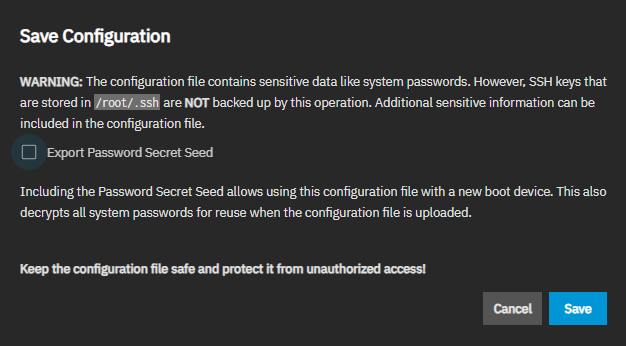
Select Export Password Secret Seed and then click Save. The system downloads the system configuration. Keep this file in a safe location on your network where files are regularly backed up.
A downloaded configuration file always contains the full settings database. The Export Password Secret Seed option determines whether TrueNAS can restore the sensitive, encrypted fields in that database.
The secret seed (the
- TrueNAS deletes some items entirely, such as cloud credentials, SSH keychain credentials, Kerberos keytabs, and any replication or rsync task that uses an SSH connection.
- It empties the values of others, such as SED passwords, certificate private keys, iSCSI CHAP secrets, two-factor authentication (2FA) secrets, and service passwords. The item remains, but the sensitive value it needs is blank.
TrueNAS also disables SMB authentication for all local user accounts.
In this table, Yes means the item is present and usable after a restore. TrueNAS does not store items marked Never in the configuration file, so back them up separately.
| Item | Without Secret Seed | With Secret Seed |
|---|---|---|
| User and root or admin login passwords | Yes | Yes |
| API keys | Yes | Yes |
| Local user SMB (NT) password hashes | No | Yes |
| Two-factor authentication (2FA) secrets | No | Yes |
| Global and per-disk SED passwords | No | Yes |
| ZFS encryption keys (key-type datasets and pools) | No | Yes |
| ZFS encryption passphrases (passphrase-type datasets) | Never | Never |
| SSH host keys (server keypairs) | No | Yes |
| SSH connection keypairs (keychain credentials) | No | Yes |
| Cloud sync and cloud backup credentials | No | Yes |
| Certificate and CSR private keys | No | Yes |
| iSCSI CHAP secrets | No | Yes |
| Directory services credentials and Kerberos keytabs | No | Yes |
| Service passwords (email, UPS, SNMP v3, and similar) | No | Yes |
| App and container registry credentials | No | Yes |
| IPMI/BMC password | Never | Never |
TrueNAS stores login passwords and API keys as one-way hashes rather than encrypted values, so it restores them correctly with or without the secret seed.
Only you know ZFS passphrases, and TrueNAS never writes them to the configuration file. The BMC hardware stores the IPMI/BMC password, not TrueNAS.
When you configure KMIP, the KMIP server holds SED keys and ZFS key-type encryption keys, and the configuration file does not contain them.
Always back up encryption key files and passphrases separately in a secure location.
The Upload File option gives users the ability to replace the current system configuration with any previously saved TrueNAS configuration file.
Upload a configuration file that includes the secret seed whenever possible. For details on what TrueNAS preserves with and without the seed, see Configuration Backup Contents.
Uploading a configuration file from a FreeBSD-based release wipes any existing administrative users and replaces with the original root user and password from the uploaded configuration file. To secure the system after restoring from a FreeBSD-based TrueNAS config file, log in with the original root user credentials, recreate an administrative account, and finally re-disable the root account password.
TrueNAS Enterprise
Save the current system configuration with the Download File option before resetting the configuration to default settings! If you do not save the system configuration before resetting it, you could lose data that was not backed up, and you cannot revert to the previous configuration.
The Reset to Defaults option resets the system configuration to factory settings. After the configuration resets, the system restarts, and users must set a new login password.
TrueCommand provides an easy solution for users who want to schedule an automatic remote backup of the system configuration file:
- Set up TrueCommand.
- Add their TrueNAS system.
- Create and schedule the configuration file backup.