<div class="bbWrapper"><blockquote data-attributes="member: 25397" data-quote="ethereal" data-source="post: 289048"
class="bbCodeBlock bbCodeBlock--expandable bbCodeBlock--quote js-expandWatch">
<div class="bbCodeBlock-title">
<a href="/community/goto/post?id=289048"
class="bbCodeBlock-sourceJump"
rel="nofollow"
data-xf-click="attribution"
data-content-selector="#post-289048">ethereal said:</a>
</div>
<div class="bbCodeBlock-content">
<div class="bbCodeBlock-expandContent js-expandContent ">
mirfster wants your hardware list and how your hdds connect to the m/b it should help .<br />
<br />
<a href="https://forums.freenas.org/index.php?threads/forum-rules.22553/#post-134570/" target="_blank" class="link link--external" rel="nofollow ugc noopener">https://forums.freenas.org/index.php?threads/forum-rules.22553/#post-134570/</a>
</div>
<div class="bbCodeBlock-expandLink js-expandLink"><a role="button" tabindex="0">Click to expand...</a></div>
</div>
</blockquote><br />
i posted my system info, not sure about hdds attachemnt... you want me to pull out each drive and figure what serial number goes to what motherboard port?</div>
<div class="bbWrapper">you provided the system info but not the harware<br />
<br />
and you didn't say that you moved the server while it was running</div>
<div class="bbWrapper">Cursory review only (others may see more): I see one disk with major issues "/dev/ada2" (The Seagate HD). That sucker is hurting for sure...<br />
<br />
I would suggest that you:<br />
<ol>
<li data-xf-list-type="ol">Power down</li>
<li data-xf-list-type="ol">Double, triple check your cables (SATA and PW)<br />
<ul>
<li data-xf-list-type="ul">Replace the ones for the Seagate and that other missing drive (if possible)</li>
</ul></li>
<li data-xf-list-type="ol">Power On, but opt to enter the BIOS<br />
<ul>
<li data-xf-list-type="ul">This is just so that you can check to see if the drives are detected by the system before booting FreeNas</li>
<li data-xf-list-type="ul">If you have a HBA with the BIOS installed it should show you which drives are detected during the process<ul>
<li data-xf-list-type="ul">Note: You can hit the [Pause] button on your KB to stop it from flying by too fast to read (Hit [Enter] to resume)</li>
</ul></li>
<li data-xf-list-type="ul">If you are connecting the drives directly to the MB, then look in there to check if it sees all the disks</li>
</ul></li>
<li data-xf-list-type="ol">Basically if your system can't see the drives then neither will FreeNas</li>
</ol>My concern is that while it sees 5 of the 6 drives (albeit one is on its deathbed), it should still function (since you have RaidZ2).<br />
<br />
As far as the hard drive connections, all I was asking is if they are directly connected to the Motherboard or if they are connected to an HBA (or other card). If so, what is the make/model of the card?</div>
<div class="bbWrapper">You moved it while it was running? That can cause some damage to HDDs due to head crashing into the platters. <br />
<br />
What are the HDDS attached to? HBA or MB SATA ports. ?<br />
<br />
<br />
Sent from my iPhone using Tapatalk</div>
<div class="bbWrapper"><blockquote data-attributes="member: 53160" data-quote="Mirfster" data-source="post: 289066"
class="bbCodeBlock bbCodeBlock--expandable bbCodeBlock--quote js-expandWatch">
<div class="bbCodeBlock-title">
<a href="/community/goto/post?id=289066"
class="bbCodeBlock-sourceJump"
rel="nofollow"
data-xf-click="attribution"
data-content-selector="#post-289066">Mirfster said:</a>
</div>
<div class="bbCodeBlock-content">
<div class="bbCodeBlock-expandContent js-expandContent ">
Cursory review only (others may see more): I see one disk with major issues "/dev/ada2" (The Seagate HD). That sucker is hurting for sure...<br />
<br />
I would suggest that you:<br />
<ol>
<li data-xf-list-type="ol">Power down</li>
<li data-xf-list-type="ol">Double, triple check your cables (SATA and PW)<ul>
<li data-xf-list-type="ul">Replace the ones for the Seagate and that other missing drive (if possible)</li>
</ul></li>
<li data-xf-list-type="ol">Power On, but opt to enter the BIOS<ul>
<li data-xf-list-type="ul">This is just so that you can check to see if the drives are detected by the system before booting FreeNas</li>
<li data-xf-list-type="ul">If you have a HBA with the BIOS installed it should show you which drives are detected during the process<ul>
<li data-xf-list-type="ul">Note: You can hit the [Pause] button on your KB to stop it from flying by too fast to read (Hit [Enter] to resume)</li>
</ul></li>
<li data-xf-list-type="ul">If you are connecting the drives directly to the MB, then look in there to check if it sees all the disks</li>
</ul></li>
<li data-xf-list-type="ol">Basically if your system can't see the drives then neither will FreeNas</li>
</ol>My concern is that while it sees 5 of the 6 drives (albeit one is on its deathbed), it should still function (since you have RaidZ2).<br />
<br />
As far as the hard drive connections, all I was asking is if they are directly connected to the Motherboard or if they are connected to an HBA (or other card). If so, what is the make/model of the card?

</div>
<div class="bbCodeBlock-expandLink js-expandLink"><a role="button" tabindex="0">Click to expand...</a></div>
</div>
</blockquote><br />
its a full house but all are connected straight to the motherboard..</div>
<div class="bbWrapper"><blockquote data-attributes="member: 50818" data-quote="maglin" data-source="post: 289068"
class="bbCodeBlock bbCodeBlock--expandable bbCodeBlock--quote js-expandWatch">
<div class="bbCodeBlock-title">
<a href="/community/goto/post?id=289068"
class="bbCodeBlock-sourceJump"
rel="nofollow"
data-xf-click="attribution"
data-content-selector="#post-289068">maglin said:</a>
</div>
<div class="bbCodeBlock-content">
<div class="bbCodeBlock-expandContent js-expandContent ">
You moved it while it was running? That can cause some damage to HDDs due to head crashing into the platters.<br />
<br />
What are the HDDS attached to? HBA or MB SATA ports. ?<br />
<br />
<br />
Sent from my iPhone using Tapatalk
</div>
<div class="bbCodeBlock-expandLink js-expandLink"><a role="button" tabindex="0">Click to expand...</a></div>
</div>
</blockquote><br />
MB sata ports</div>
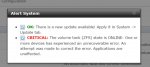
<div class="bbWrapper">you guys are not gonna believe this.... <br />
<br />
i powered down.. unclasped a stick of memory so i can pull it to see the sticker<br />
<br />
put the memory back in the motherboard<br />
<br />
powered up <br />
<br />
came in the other room, logged into the gui, and all hard drives are there!!!! and it says that its resilvering one!!!<br />
<br />
now it says this...</div>
<div class="bbWrapper">im back in the game!!! thank you all so much!!!<br />
<br />
my tank volume is healthy but what should i do next? anything besides replacing the seagate?</div>
<div class="bbWrapper">one more thing guys.. does this tell me anything i should know?<br />
<br />
<div class="bbCodeBlock bbCodeCode"><div class="type">Code:</div><pre>Welcome to FreeNAS
[root@freenas] ~# zpool status -x
pool: tank
state: ONLINE
status: One or more devices has experienced an unrecoverable error. An
attempt was made to correct the error. Applications are unaffected.
action: Determine if the device needs to be replaced, and clear the errors
using 'zpool clear' or replace the device with 'zpool replace'.
see: http://illumos.org/msg/ZFS-8000-9P
scan: resilvered 49.4G in 0h20m with 0 errors on Fri May 27 05:04:32 2016
config:
NAME STATE READ WRITE CKSUM
tank ONLINE 0 0 0
raidz2-0 ONLINE 0 0 0
gptid/7ea641e5-2398-11e4-b424-10c37b949d82 ONLINE 0 0 30
gptid/7f0871b3-2398-11e4-b424-10c37b949d82 ONLINE 0 0 0
gptid/7f6b618c-2398-11e4-b424-10c37b949d82 ONLINE 0 0 0
gptid/7fcfaad8-2398-11e4-b424-10c37b949d82 ONLINE 0 0 26
gptid/80883a33-2398-11e4-b424-10c37b949d82 ONLINE 0 0 0
gptid/814b9861-2398-11e4-b424-10c37b949d82 ONLINE 0 0 0
errors: No known data errors
[root@freenas] ~#
</pre></div></div>
<div class="bbWrapper">probably caused by bad drives - hopefully one is the seagate. i'd replace all drives with cksum errors.<br />
<br />
it is possible your ram caused the problem when it was jiggled ?</div>
<div class="bbWrapper">Suggestions:<br />
<ol>
<li data-xf-list-type="ol">You should have been getting alerts from FreeNas (via e-mails) long before this, so that tells me you don't have that setup correctly</li>
<li data-xf-list-type="ol">Same goes for SMART Tests (Short and Long)</li>
<li data-xf-list-type="ol">You may want to do a memory test</li>
<li data-xf-list-type="ol">See the bottom two items in my sig to get info on these (DrKK's first, then Bidule0hm's)</li>
<li data-xf-list-type="ol">If not doing backups, now is a great time to give it some serious thought. Nothing is a replacement for regular backups (even FreeNas)</li>
<li data-xf-list-type="ol">Be glad you went with RaidZ2 ;)</li>
<li data-xf-list-type="ol">If you are curious about SMART results, reference this: <a href="https://en.wikipedia.org/wiki/S.M.A.R.T" target="_blank" class="link link--external" rel="nofollow ugc noopener">https://en.wikipedia.org/wiki/S.M.A.R.T</a>.<ul>
<li data-xf-list-type="ul">Particularly the "Known ATA S.M.A.R.T. attributes" section</li>
</ul></li>
</ol></div>
<div class="bbWrapper">hello all, i was only able to afford one new WD Red 2tb drive, i currently have two degraded drives that have check sum errors and the seagate with the 924 relocated sectors... which drive should i replace first?</div>